
Welcome to OneSuite!
We created this guide as your first step to mastering OneSuite, which is built specifically to handle all client-related work for growth-focused service businesses like yours.
OneSuite is business management software for service businesses: it runs your client work in one place, from the first lead to the paid invoice. You win the work in CRM, deliver it in Projects, track the hours in Timesheet, and bill for it in Invoices, without copying details from one tool to the next.
In this guide you’ll learn how to:
- Decide whether OneSuite fits the way your business works
- Find each module in the grouped sidebar
- Follow a client from lead to paid invoice
- Plan your first week in OneSuite
- Choose where to read next in this help center
What is OneSuite?
OneSuite is one connected workspace for the modern service business: leads, clients, contracts, projects, time, expenses, estimates, invoices, and reports.
It was built from an agency owner’s perspective. Running client work should not need five subscriptions and 20 open browser tabs, so the modules share the same clients, projects, and people. A project knows its client, an invoice can pull the project’s tracked hours, and your reports read from the same records.
Who is OneSuite for?
OneSuite is for businesses that sell their time and expertise to clients.
- Agencies and studios: marketing agencies, design studios and digital services firms that run several client projects at once.
- Consultancies: firms that bill by the hour, by a fixed fee, or from a retainer.
- Owners and admins: the people who set up the workspace, choose the modules and decide who can do what.
- Project managers: people who need to see progress, hours, and budgets across clients and projects.
- Team members and contractors: people who work on tasks, track their time, and log expenses.
What modules does OneSuite include?
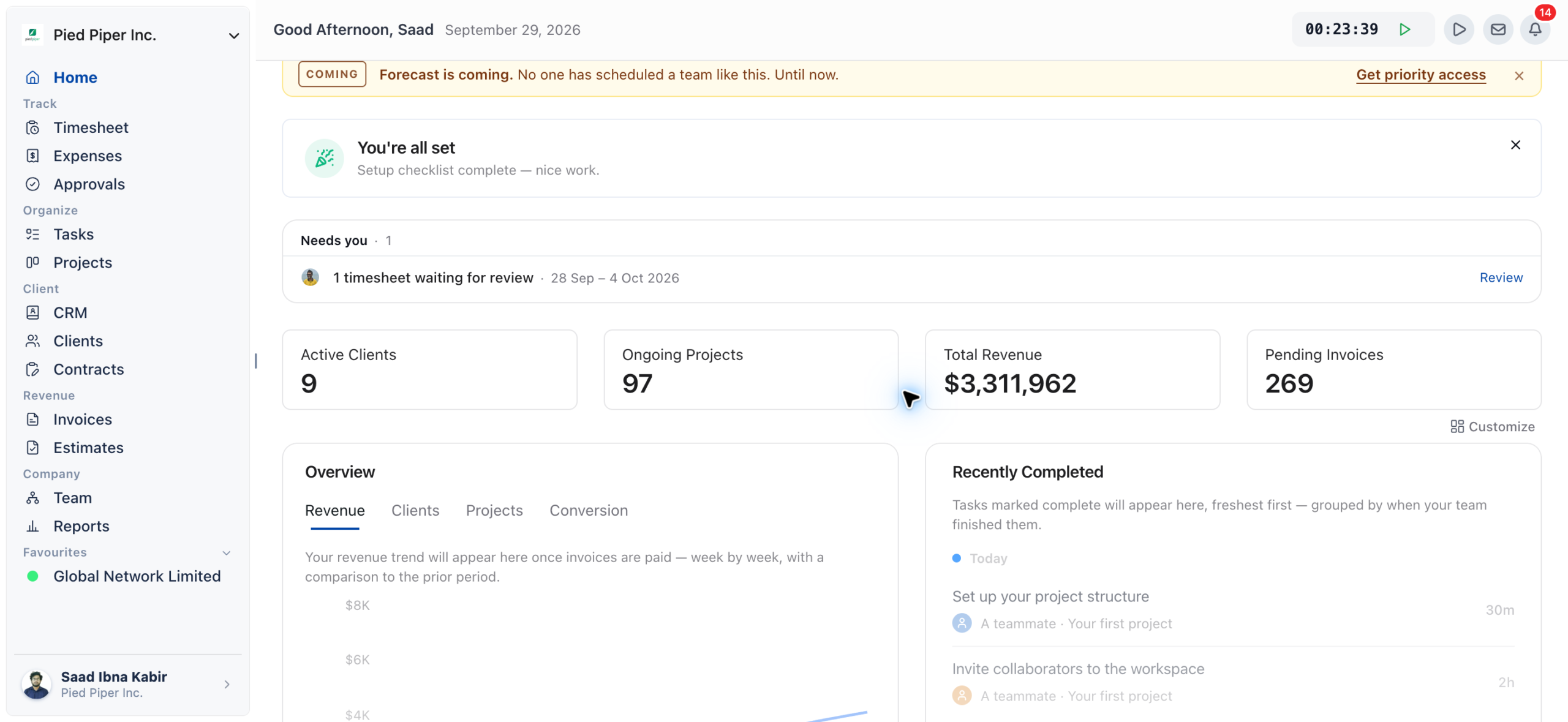
OneSuite groups its modules in the sidebar under Home and five headings: Track, Organize, Client, Revenue, and Company.
| Sidebar group | Module | What you do there |
| Home | Your dashboard of key numbers and widgets. | |
| Track | Timesheet | Track time with a timer or by entering a duration. |
| Track | Expenses | Log project costs and attach receipts. |
| Track | Approvals | Review your team’s time and expenses, then approve or send them back. |
| Organize | Tasks | See your tasks across every project. |
| Organize | Projects | Plan and deliver client work, and set each project’s billing and budget. |
| Client | CRM | Manage people, companies, and opportunities in your pipeline. |
| Client | Clients | Keep client profiles and give clients portal access. |
| Client | Contracts | Create documents and send them for signature. |
| Revenue | Invoices | Bill clients, record payments, and run recurring invoices and retainers. |
| Revenue | Estimates | Send estimates and turn accepted ones into invoices. |
| Company | Team | Invite people and manage their capacity and rates. |
| Company | Reports | Read time, profitability and invoicing reports. |
Two areas sit outside the sidebar. Email opens from the Inbox icon in the top bar. Settings and Billing open from the account menu: click your name at the bottom of the sidebar.
A row appears only when its module is switched on for your business, and your profile allows you to open it. If you don’t see a module in the sidebar, an admin can switch it on in Settings> Customize Navigation.
How does work move through OneSuite?
Work in OneSuite follows the life of a client, and each module hands its records to the next one.
- A lead arrives in CRM as a person or company, and you track the deal as an opportunity.
- You send a contract from Contracts and turn the opportunity into a client with Convert to Client.
- You create a project in Projects for that client and set how it is billed.
- Your team tracks time and expenses against the project, and a manager approves them in Approvals.
- You invoice the client from Invoices, which offers the billable time and expenses that are not yet invoiced.
- Reports shows the hours, profitability and invoicing across all of it.
For each chain in detail, see How Solutions Work Together.
What does your first week in OneSuite look like?
In your first week you set up the workspace, bring in your people and clients, and send your first invoice from tracked time.
| Day | What you do | Guide |
| Day 1 | Fill in your business details and switch on the modules you need. | Setting Up Your Business |
| Day 2 | Create your work types and expense categories. | How to Set Up Work Types |
| Day 3 | Invite your team and set their rates and capacity. | Inviting Team Members |
| Day 4 | Add your leads and clients, then create projects with billing. | Adding Your First Client |
| Day 5 | Track time and expenses, approve them, and send your first invoice. | Sending Your First Invoice |
You don’t have to finish in five days. Every setting can be changed later.
How is this help center organized?
The help center has one category per area of OneSuite, so you can read in order or go straight to the module you need.
| Category | What it covers |
| OneSuite 101 | Core concepts, navigation and terms. |
| Quick Start Guide | Setup, your first client, your first hours and your first invoice. |
| Dashboard | The Home dashboard and its widgets. |
| CRM | People, companies, opportunities and pipeline stages. |
| Client Management | Clients, client profiles and the client portal. |
| Project Management | Projects, boards, templates, and project billing and budgets. |
| Tasks | Your tasks across projects. |
| Contracts | Creating, sending, and signing documents. |
| Team Management | Inviting and managing your team. |
| Time Tracking & Timesheets | Tracking time, work types and timesheet preferences. |
| Expenses | Logging expenses and setting up categories. |
| Approvals | Approving time and expenses, and the approval policy. |
| Invoices & Payments | Invoices, payments, recurring invoices and retainers. |
| Estimates | Creating and sending estimates. |
| Reports | Reading, saving and scheduling reports. |
| Integrations | Accounting, payment, calendar and other connected tools. |
| Settings & Billing | Workspace settings, profiles and permissions, and your subscription. |
| Email Inbox | Connecting and using your email inbox. |
Not using OneSuite yet? Start your free trial →
FAQs
What is OneSuite used for?
OneSuite is used to run the client side of a service business in one place. You manage leads and clients, deliver projects, track time and expenses, send estimates and invoices, and read reports on the same records.
Who should use OneSuite?
OneSuite suits agencies, studios, consultancies and other businesses that bill clients for their time and expertise. Owners and admins set it up, project managers run the work, and team members track their tasks, time and expenses.
Can I just use separate tools for CRM, time tracking and invoicing instead?
You can, but you then copy clients, projects and hours between them by hand. In OneSuite a project already knows its client, and an invoice can pull the project’s billable time and expenses, so nothing is typed twice.
Can I turn off the modules I don’t need?
Yes. An admin can switch modules on or off in Settings, Customize Navigation, in the Modules this business uses block. Clients always stays on, and Home and Team are not in the list.
Where is email in OneSuite?
Email is not in the sidebar. Click the Inbox icon in the top bar to open it. The icon shows when the Email Inbox module is on and you can access CRM or Clients.
Does OneSuite give my clients their own portal?
Yes. Clients you invite to the client portal sign in to see the areas you grant them, such as their projects, contracts and invoices.
What to do next
Set up your workspace: Work through the recommended setup order in Setting Up Your Business.
Find your way around: Learn the sidebar, top bar and account menu in Navigating OneSuite.
See the connections: Follow each chain from lead to report in How Solutions Work Together.