
Project templates are reusable project blueprints with sections and tasks already mapped out, so a new project starts ready to work in. They suit projects your agency repeats, runs to a standard, or hands between several team members.
In this guide you’ll learn how to:
- Save an existing project as a template
- Browse the templates page
- Start a new project from a template
- Set the start and due dates a template needs
- Build a template from scratch
How to save a project as a template
You save a project as a template by choosing Save as template from the project’s menu and giving the template a name.
- Click Projects in the sidebar.
- Open the menu on the project’s row or card and click Save as template.
- Check the Template name. It starts as the project’s name.
- Optional: add a Description (optional).
- Click Save template.
OneSuite confirms with Saved as template, and the template appears under My Templates.
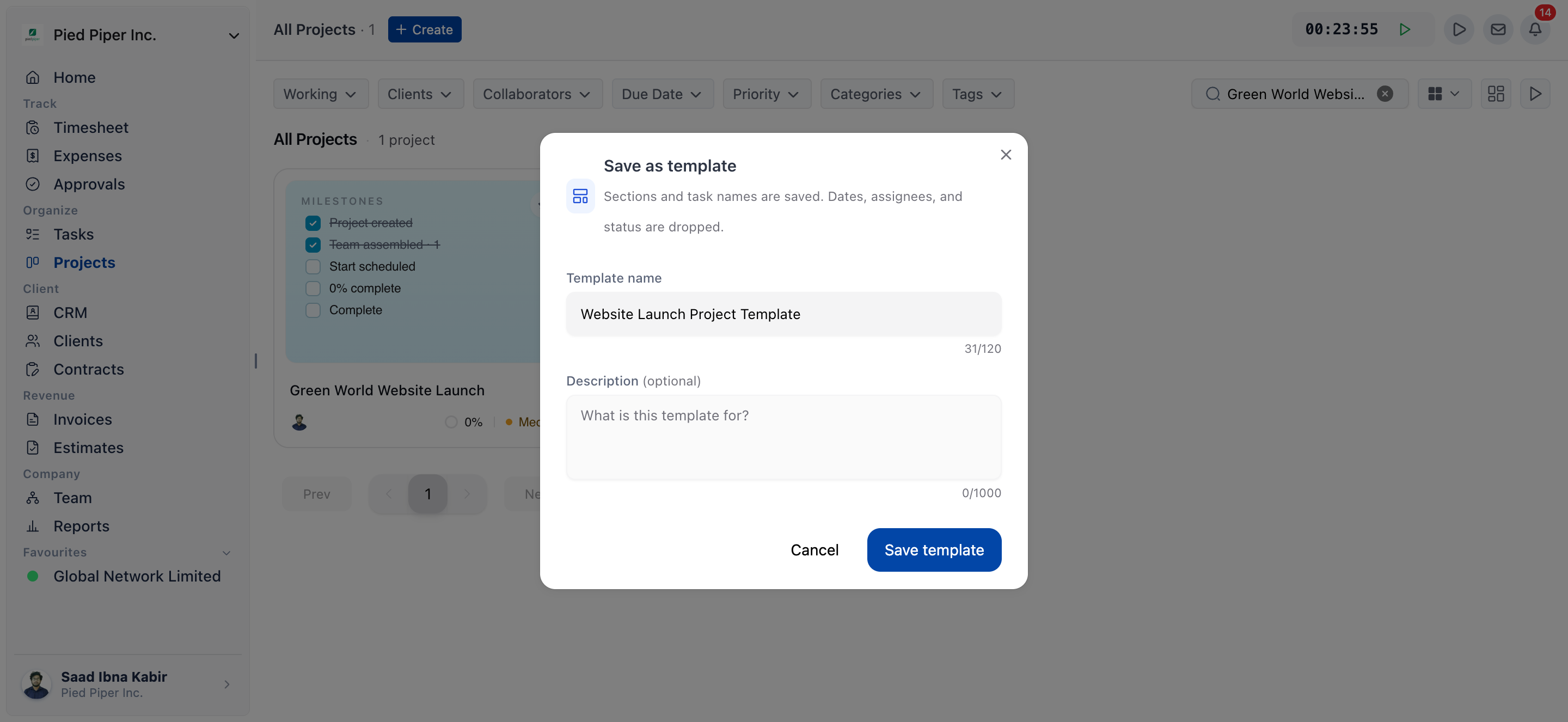
What a saved template keeps
The dialog says it plainly: “Sections and task names are saved. Dates, assignees, and status are dropped.” Set assignees and dates again on each new project you create from the template.
| Field | Limit | Notes |
|---|---|---|
| Template name | 120 characters | Required. Placeholder e.g. Sprint planning. |
| Description (optional) | 1,000 characters | Placeholder What is this template for? |
Save as template only shows for people who can edit the project. Saving does not check any dates. If the save fails, OneSuite shows the reason, or Unable to save template.
How to browse the templates page
The templates page lists every template you can use, grouped into your own templates, featured templates and templates by team.
- Open the templates page in one of these ways:
- In the Create Project drawer, click See all templates.
- On the Projects page, click the Customize icon, open Project Templates, then click Browse all.
- Browse the sections:
- My Templates: the templates your business has saved.
- Featured templates: “Our most-used templates across teams.”
- Team categories: Marketing, Engineering, Design, Product, Sales, HR & People and Operations.
- Use Search, or filter by Type (All, Featured, My Templates) and Categories, to narrow the list.
- Click a template to preview its sections and tasks.
If you haven’t saved any templates yet, My Templates shows No saved templates yet.
How to start a project from a template
You start a project from a template by clicking Use template in its preview, which opens the Create Project drawer with the template already chosen.
- On the templates page, click the template you want.
- In the preview, click Use template.
- Enter the Project Name and the other project details.
- Set the Start date and Due date under Project timeline if the template needs them.
- Click Create Project.
The template’s sections and tasks are added to the new project. You can also pick a template directly in the Create Project drawer under Use a project template for quick start. See Laying the Groundwork: Project Creation in OneSuite.
When does a template need a start or due date?
A template needs a project start date, a due date or both when some of its tasks are scheduled relative to those dates. The check runs when you create a project from the template, not when you save one.
When you pick such a template, the Project timeline section asks for the dates. A template that schedules tasks from the due date shows this note: “This template schedules some tasks relative to the project due date, so a due date is required.”
| Message | What it means | What to do |
|---|---|---|
| Please set a project start date for this template | Some tasks are scheduled from the project start. | Set a Start date. |
| Please set a project due date for this template | Some tasks are scheduled from the project due date. | Set a Due date. |
| Due date cannot be earlier than start date | The due date is before the start date. | Move the Due date later, or the Start date earlier. |
A template with no date-based tasks needs no dates.
How to build a template from scratch
You build a template from scratch with Create on the templates page, or Create template in the Projects Customize panel.
- On the templates page, click Create.
- Click the title at the top, which starts as Untitled template, and type a name. Until the template has a name, Save template stays disabled and its hint reads Name your template to enable saving.
- Add sections with Add Section, and add tasks to each section.
- Click Save template. A template also needs at least one named section, or the hint reads Add at least one named section to save.
To change a template you saved, open its preview and click Edit. Edit only shows on your own templates.
Project templates and task templates are different
A project template sets up a new project’s whole structure, with its sections and tasks. A task template adds a set of tasks and subtasks to a project that already exists. See Task Templates.
Not using OneSuite yet? Start your free trial →
FAQs
How do I save a project as a template in OneSuite?
Open the project’s menu on the Projects page and click Save as template. Enter a Template name, add an optional description, and click Save template.
Why does OneSuite ask for a start date when I use a template?
Some of the template’s tasks are scheduled relative to the project start or due date, so the project needs those dates. Set them under Project timeline in the Create Project drawer.
Does saving a template keep assignees and due dates?
No. A saved template keeps sections and task names. Dates, assignees and status are dropped, so you set them on each new project.
Where do I find the templates I saved?
Open the templates page and look under My Templates. You can reach it from See all templates in the Create Project drawer.
Can I just duplicate an old project instead of using a template?
You can. Duplicate in the project’s menu copies one project. A template is better when you start the same kind of project often, because it carries no old dates or finished work and appears in the template picker.
What to do next
Create your next project: Pick a template in the create drawer with Laying the Groundwork: Project Creation in OneSuite.
Add task sets on the fly: Drop reusable task lists into live projects with Task Templates.
Work the board: Move tasks between sections with Managing Project Boards in OneSuite.