Skip to content
OneSuite Logo
  • SolutionsExpand
    • Client Portal

      Ensure transparency & gain trust

      Invoice

      Create invoices in minutes & get paid

      Project Management

      Manage tasks smartly & deliver timely

      CRM

      Nurture leads and win more clients

      Document & E-Signature

      Create & sign documents easily

      Team & Collaborators

      Work together, stay aligned

      Email Inbox

      Manage client emails in one place

      Time Tracking

      Track hours and boost productivity

      Productized Service

      Package and sell services easily

  • Use CasesExpand
    • Marketing Agency

      Manage campaigns, clients, and billing in one place so you can focus on delivering results.

      SEO Agency

      Track projects, share reports, and invoice clients without juggling five different tools.

      Video Editing

      Streamline approvals, revisions, and payments so you spend more time in the timeline.

      Local SEO

      Organize multi-location clients, automate invoicing, and keep every project on track.

      Photography

      From booking to final delivery, manage your entire client workflow in a single dashboard.

      Event Management

      Coordinate timelines, vendors, and client communications without anything slipping through the cracks.

      Creative Agency

      One workspace for briefs, feedback, and billing so your creative energy stays on the work.

      Consulting

      Proposals, project tracking, and invoicing unified so you look as professional as your advice.

      IT Services

      Manage tickets, retainers, and client portals without duct-taping a dozen SaaS tools together.

  • ResourcesExpand
    • Documentation

      Read guides and help docs

      Affiliate

      Partner and earn together

      Integrations

      Connect tools effortlessly

      Roadmap

      See what’s coming next

      Changelog

      Stay updated with the latest

      Support

      Get help whenever you need it

      Compare

      See how OneSuite stacks up

      Case Study

      Real results, real teams

      FAQ

      Find answers to common questions

  • Pricing
  • For Agency

Start free trial

Help Center

  • Documentation
  • Public Roadmap
  • Book a demo
  • Get Support
OneSuite Logo
intro to onesuite

OneSuite 101

6
  • Introduction
  • Understanding OneSuite’s Structure
  • How Solutions Work Together
  • Navigating OneSuite
  • All OneSuite Capabilities
  • OneSuite Glossary
quick start guide

Quick Start Guide

7
  • Setting Up Your Business
  • Adding Your Payment Methods
  • Inviting Team Members
  • Adding Your First Leads
  • Adding Your First Client
  • Giving Your Client Portal Access
  • Sending Your First Proposal

CRM

7
  • Customizing Your Opportunities View
  • CRM Overview
  • Adding People
  • Adding Companies
  • Creating Opportunity
  • How Opportunities, Companies, and People Work Together
  • Understanding Pipeline Stages
client

Client Management in OneSuite

7
  • Client Portal Customization 
  • Understanding the Clients Solution
  • Adding Clients
  • Client Profiles
  • Imports, Exports, and Search
  • The OneSuite Client Portal
  • Video Documentation : Client Management
pm

Manage your Projects Effortlessly

7
  • Subtask Behavior & Movement Management
  • Laying the Groundwork: Project Creation in OneSuite
  • Managing Project Boards in OneSuite
  • Adding Tasks to Boards in OneSuite
  • Lifesaver:Templates in OneSuite
  • Custom Categories, Tags, and Labels in Projects
  • Video Documentation : Project Management

Documents

5
  • Overview
  • Creating a Document from Scratch
  • Uploading a PDF Document
  • Sending Documents to Parties to Sign
  • Signing a Document
team

OneSuite's Team Management

4
  • Inviting Collaborators in OneSuite
  • Creating Personalized Departments in OneSuite
  • Managing Team Members in OneSuite
  • Video Documentation : Team Collaboration
Invoices & Payments

Invoices & Payments

7
  • Access & Navigation
  • Invoice Settings & Customization
  • Create One-time Invoices
  • Creating Recurring Invoices
  • How to set taxes on your invoices
  • How to Add Direct Bank Transfer Instructions to Your Invoices
  • How to Customize Invoice Email Messages

Time Tracking & Timesheets

4
  • Invoice Generation from Billable Hours
  • Timesheet Management & Approval
  • Time Tracking in OneSuite
  • Time Tracking & Timesheets 

Email Inbox in OneSuite

5
  • Gmail and Outlook integration
  • How to Integrate Microsoft Outlook in OneSuite 
  • How to Use Email Templates in OneSuite 
  • How to Integrate Gmail in OneSuite 
  • How to Send and Receive Email in OneSuite 

Dashboard

6
  • Documents and Contracts
  • CRM, Client and pipeline
  • Project Task
  • Revenue Forecasting
  • How to Customize Your Dashboard
  • Overview 
View Categories
  • Home
  • Docs
  • Dashboard
  • Project Task

Project Task

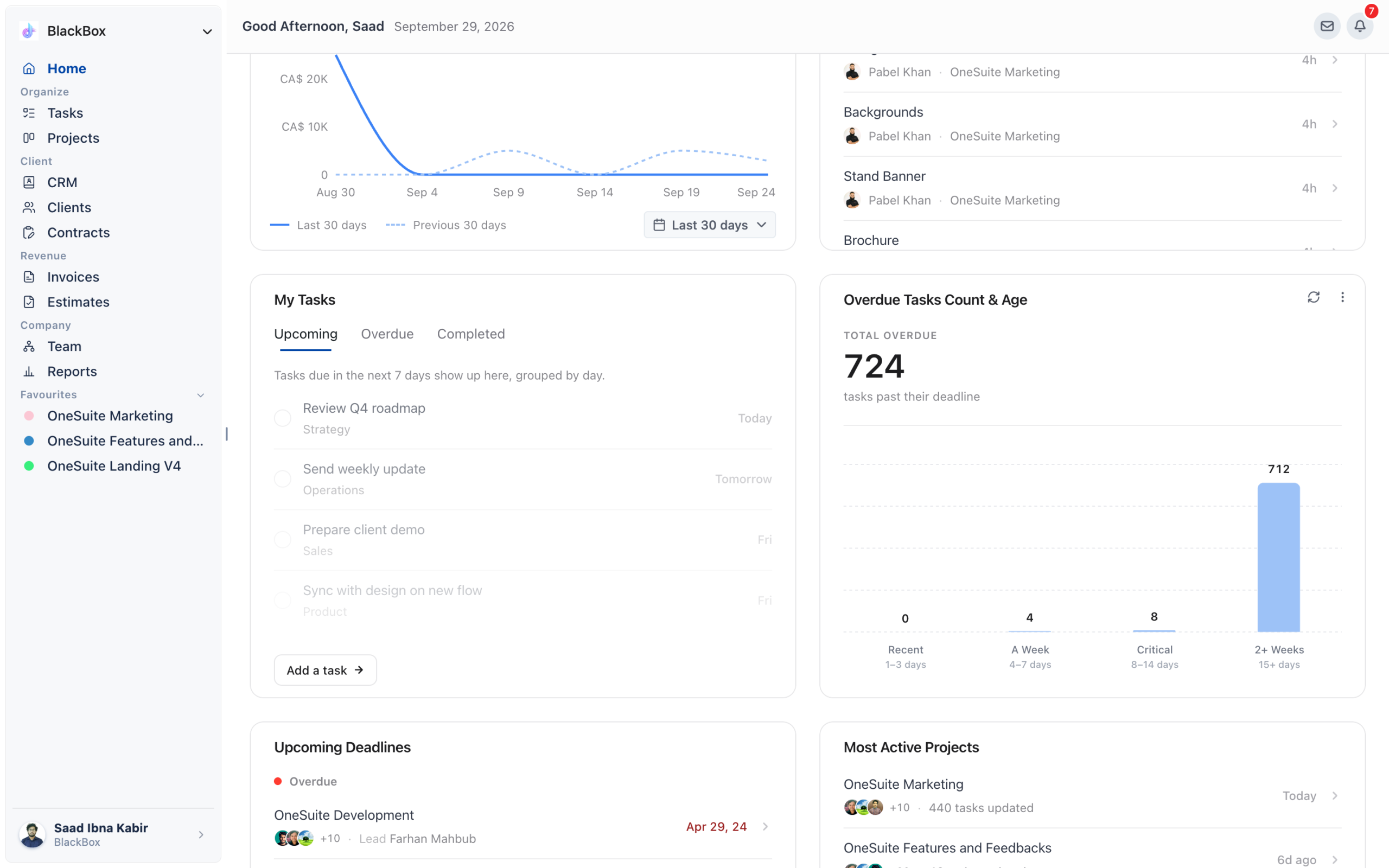
My Tasks #

Shows your personal task queue  every task assigned to you, across all projects. Three tabs: Upcoming (due in the next 7 days), Overdue, and Completed.

Without a consolidated task view, it’s easy to miss a deadline buried in a specific project board. My Tasks surface everything that needs your attention, regardless of which project it lives in.

The Upcoming tab groups tasks by day Today, Tomorrow, then by day name for the rest of the week.

Click the circle to the left of a task to mark it complete directly from the Dashboard.

Click Add a task →to create a new task without leaving the Dashboard.

Switch to Overdue to  see everything past its due date clear these first.

Overdue Tasks Count & Age #

Shows the total number of tasks past their deadline, broken into four age buckets: Recent (1–3 days), A Week (4–7 days), Critical (8–14 days), and 2+ Weeks (15+ days).

The older a task gets, the harder it is to recover. The age breakdown lets you triage immediately tackle Critical and 2+ Weeks tasks before anything else, as those are most likely to affect client relationships.

Review this widget every morning as part of your daily planning.

A large number in the 2+ Weeks bucket often signals tasks that are blocked, not just delayed. Investigate before reassigning.

Click through to the relevant project to reassign, unblock, or close each task.

Recently Completed    #

Shows tasks your team has marked complete, grouped by when they finished Today, Earlier, and by date for older completions. The most recent completions always appear at the top.

It’s easy to focus on what’s pending and miss celebrating what’s done. This widget gives you instant visibility into team momentum and helps you catch when project activity slows down.

Tasks marked complete in any project appear here automatically no extra action needed.

Each entry shows the task name, the team member who completed it, and the project it belongs to.Click View your projects →to open the full project board.

Upcoming Deadlines #

Lists projects with approaching deadlines, sorted by urgency. Projects past their deadline are flagged in red as Overdue.

Missing a project deadline damages client trust. Having upcoming deadlines visible on your Dashboard means you’re never surprised you can redistribute team resources before a deadline slips.

Each project shows the team members assigned, the lead, and the deadline date.

Red dates indicate overdue projects act on these first.

Click any project row to jump directly to that project’s board

Most Active Projects #

Surfaces the projects with the most task activity recently, measured by the number of tasks updated. Shows the last-updated timestamp and team members involved.

Activity is a proxy for health. Projects that haven’t had updates in weeks may be stalled without anyone flagging it.

Use this widget to quickly spot where your team is spending the most time.

If a project that should be active isn’t appearing here, it may be blocked or deprioritized worth a conversation.

Click any project to open it directly.

Updated on May 22, 2026

Did this article answer your question?

  • Happy
  • Sad
CRM, Client and pipelineRevenue Forecasting

Leave a Reply Cancel reply

Your email address will not be published. Required fields are marked *

This site uses Akismet to reduce spam. Learn how your comment data is processed.

Table of Contents
  • My Tasks
  • Overdue Tasks Count & Age
  • Recently Completed   
  • Upcoming Deadlines
  • Most Active Projects
OneSuite Logo

Streamline your agency's workflow while you focus on growth—manage clients, projects, teams, proposals, contracts, and invoices effortlessly with OneSuite!

product hunt

Follow Us On

  • Facebook
  • X
  • Instagram
  • LinkedIn

Join Our Community

  • Facebook
  • WhatsApp

Features

Projects

Lead Pipeline

Documents

Invoices

Client Portal

Teams

Resources

Contact

Support

Docs

Blog

Branding

Become an affiliate

Agency Partner Program

Public roadmap

Book a demo

Compare

OneSuite vs. Kitchen Co

OneSuite vs. Moxie

OneSuite vs. Flowlu

OneSuite vs. Plutio

OneSuite vs. Bonsai

OneSuite vs. ClientManager

  • Terms of use
  • Privacy policy
  • Cookie policy
  • Refund policy
  • Acceptable use policy
  • Data processing terms
  • Solutions
    • Client Portal

      Ensure transparency & gain trust

      Invoice

      Create invoices in minutes & get paid

      Project Management

      Manage tasks smartly & deliver timely

      CRM

      Nurture leads and win more clients

      Document & E-Signature

      Create & sign documents easily

      Team & Collaborators

      Work together, stay aligned

      Email Inbox

      Manage client emails in one place

      Time Tracking

      Track hours and boost productivity

      Productized Service

      Package and sell services easily

  • Use Cases
    • Marketing Agency

      Manage campaigns, clients, and billing in one place so you can focus on delivering results.

      SEO Agency

      Track projects, share reports, and invoice clients without juggling five different tools.

      Video Editing

      Streamline approvals, revisions, and payments so you spend more time in the timeline.

      Local SEO

      Organize multi-location clients, automate invoicing, and keep every project on track.

      Photography

      From booking to final delivery, manage your entire client workflow in a single dashboard.

      Event Management

      Coordinate timelines, vendors, and client communications without anything slipping through the cracks.

      Creative Agency

      One workspace for briefs, feedback, and billing so your creative energy stays on the work.

      Consulting

      Proposals, project tracking, and invoicing unified so you look as professional as your advice.

      IT Services

      Manage tickets, retainers, and client portals without duct-taping a dozen SaaS tools together.

  • Resources
    • Documentation

      Read guides and help docs

      Affiliate

      Partner and earn together

      Integrations

      Connect tools effortlessly

      Roadmap

      See what’s coming next

      Changelog

      Stay updated with the latest

      Support

      Get help whenever you need it

      Compare

      See how OneSuite stacks up

      Case Study

      Real results, real teams

      FAQ

      Find answers to common questions

  • Pricing
  • For Agency
  • Documentation
  • Public Roadmap
  • Book a demo
  • Get Support