Skip to content
OneSuite Logo
  • SolutionsExpand
    • Client Portal

      Ensure transparency & gain trust

      Invoice

      Create invoices in minutes & get paid

      Project Management

      Manage tasks smartly & deliver timely

      CRM

      Nurture leads and win more clients

      Document & E-Signature

      Create & sign documents easily

      Team & Collaborators

      Work together, stay aligned

      Email Inbox

      Manage client emails in one place

      Time Tracking

      Track hours and boost productivity

      Productized Service

      Package and sell services easily

  • Use CasesExpand
    • Marketing Agency

      Manage campaigns, clients, and billing in one place so you can focus on delivering results.

      SEO Agency

      Track projects, share reports, and invoice clients without juggling five different tools.

      Video Editing

      Streamline approvals, revisions, and payments so you spend more time in the timeline.

      Local SEO

      Organize multi-location clients, automate invoicing, and keep every project on track.

      Photography

      From booking to final delivery, manage your entire client workflow in a single dashboard.

      Event Management

      Coordinate timelines, vendors, and client communications without anything slipping through the cracks.

      Creative Agency

      One workspace for briefs, feedback, and billing so your creative energy stays on the work.

      Consulting

      Proposals, project tracking, and invoicing unified so you look as professional as your advice.

      IT Services

      Manage tickets, retainers, and client portals without duct-taping a dozen SaaS tools together.

  • ResourcesExpand
    • Documentation

      Read guides and help docs

      Affiliate

      Partner and earn together

      Integrations

      Connect tools effortlessly

      Roadmap

      See what’s coming next

      Changelog

      Stay updated with the latest

      Support

      Get help whenever you need it

      Compare

      See how OneSuite stacks up

      Case Study

      Real results, real teams

      FAQ

      Find answers to common questions

  • Pricing
  • For Agency

Start free trial

Help Center

  • Documentation
  • Public Roadmap
  • Book a demo
  • Get Support
OneSuite Logo
intro to onesuite

OneSuite 101

6
  • Introduction
  • Understanding OneSuite’s Structure
  • How Solutions Work Together
  • Navigating OneSuite
  • All OneSuite Capabilities
  • OneSuite Glossary
quick start guide

Quick Start Guide

7
  • Setting Up Your Business
  • Adding Your Payment Methods
  • Inviting Team Members
  • Adding Your First Leads
  • Adding Your First Client
  • Giving Your Client Portal Access
  • Sending Your First Proposal

CRM

7
  • Customizing Your Opportunities View
  • CRM Overview
  • Adding People
  • Adding Companies
  • Creating Opportunity
  • How Opportunities, Companies, and People Work Together
  • Understanding Pipeline Stages
client

Client Management in OneSuite

7
  • Client Portal Customization 
  • Understanding the Clients Solution
  • Adding Clients
  • Client Profiles
  • Imports, Exports, and Search
  • The OneSuite Client Portal
  • Video Documentation : Client Management
pm

Manage your Projects Effortlessly

7
  • Subtask Behavior & Movement Management
  • Laying the Groundwork: Project Creation in OneSuite
  • Managing Project Boards in OneSuite
  • Adding Tasks to Boards in OneSuite
  • Lifesaver:Templates in OneSuite
  • Custom Categories, Tags, and Labels in Projects
  • Video Documentation : Project Management

Documents

5
  • Overview
  • Creating a Document from Scratch
  • Uploading a PDF Document
  • Sending Documents to Parties to Sign
  • Signing a Document
team

OneSuite's Team Management

4
  • Inviting Collaborators in OneSuite
  • Creating Personalized Departments in OneSuite
  • Managing Team Members in OneSuite
  • Video Documentation : Team Collaboration
Invoices & Payments

Invoices & Payments

7
  • Access & Navigation
  • Invoice Settings & Customization
  • Create One-time Invoices
  • Creating Recurring Invoices
  • How to set taxes on your invoices
  • How to Add Direct Bank Transfer Instructions to Your Invoices
  • How to Customize Invoice Email Messages

Time Tracking & Timesheets

4
  • Invoice Generation from Billable Hours
  • Timesheet Management & Approval
  • Time Tracking in OneSuite
  • Time Tracking & Timesheets 

Email Inbox in OneSuite

5
  • Gmail and Outlook integration
  • How to Integrate Microsoft Outlook in OneSuite 
  • How to Use Email Templates in OneSuite 
  • How to Integrate Gmail in OneSuite 
  • How to Send and Receive Email in OneSuite 

Dashboard

6
  • Documents and Contracts
  • CRM, Client and pipeline
  • Project Task
  • Revenue Forecasting
  • How to Customize Your Dashboard
  • Overview 
View Categories
  • Home
  • Docs
  • Client Management in OneSuite
  • The OneSuite Client Portal

The OneSuite Client Portal

Imagine a world of seamless communication, transparent project progress, and a happy client experience. Enter the OneSuite Client Portal, your one-stop shop for fostering strong client relationships and streamlining project management.

Client Collaboration Made Easy

Gone are the days of endless email threads and scattered documents. The Client Portal provides a central hub for both you and your clients, ensuring everyone is on the same page.

Here’s how it empowers collaboration: #

  • Enhanced Communication: Clients have 24/7 access to a centralized repository of project information, including documents, invoices, and their dedicated dashboard. This fosters transparency and builds trust through clear communication.
  • Improved Client Experience: Empower your clients to become active participants in the project journey. The portal allows them to conveniently track progress, access files, and manage communication effectively. This translates to a more positive and engaging client experience.
  • Streamlined Collaboration: Break down communication silos! The portal empowers clients to actively participate by adding tasks, providing feedback, and staying up-to-date on project developments.

Getting Started is Easy! #

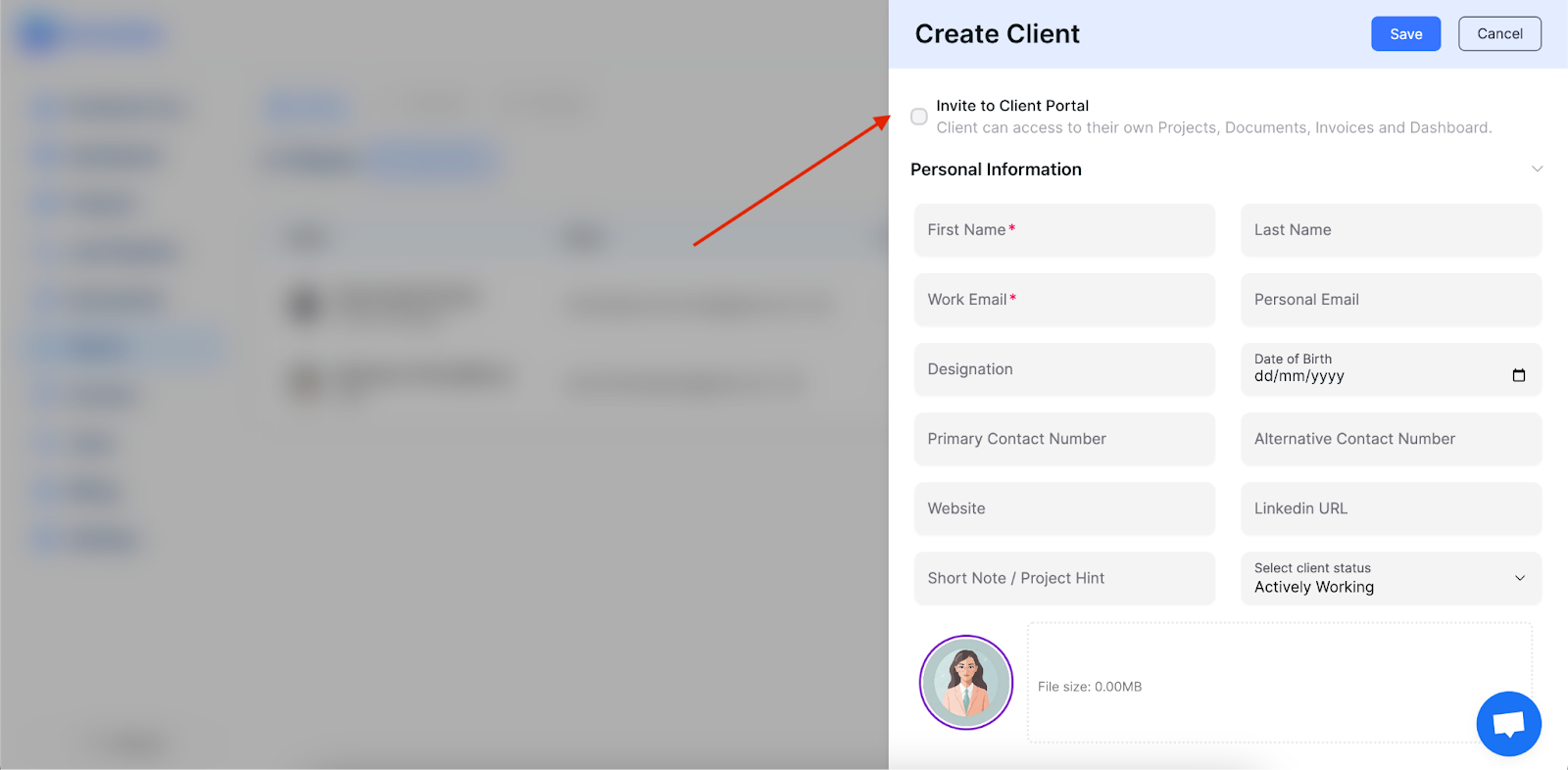
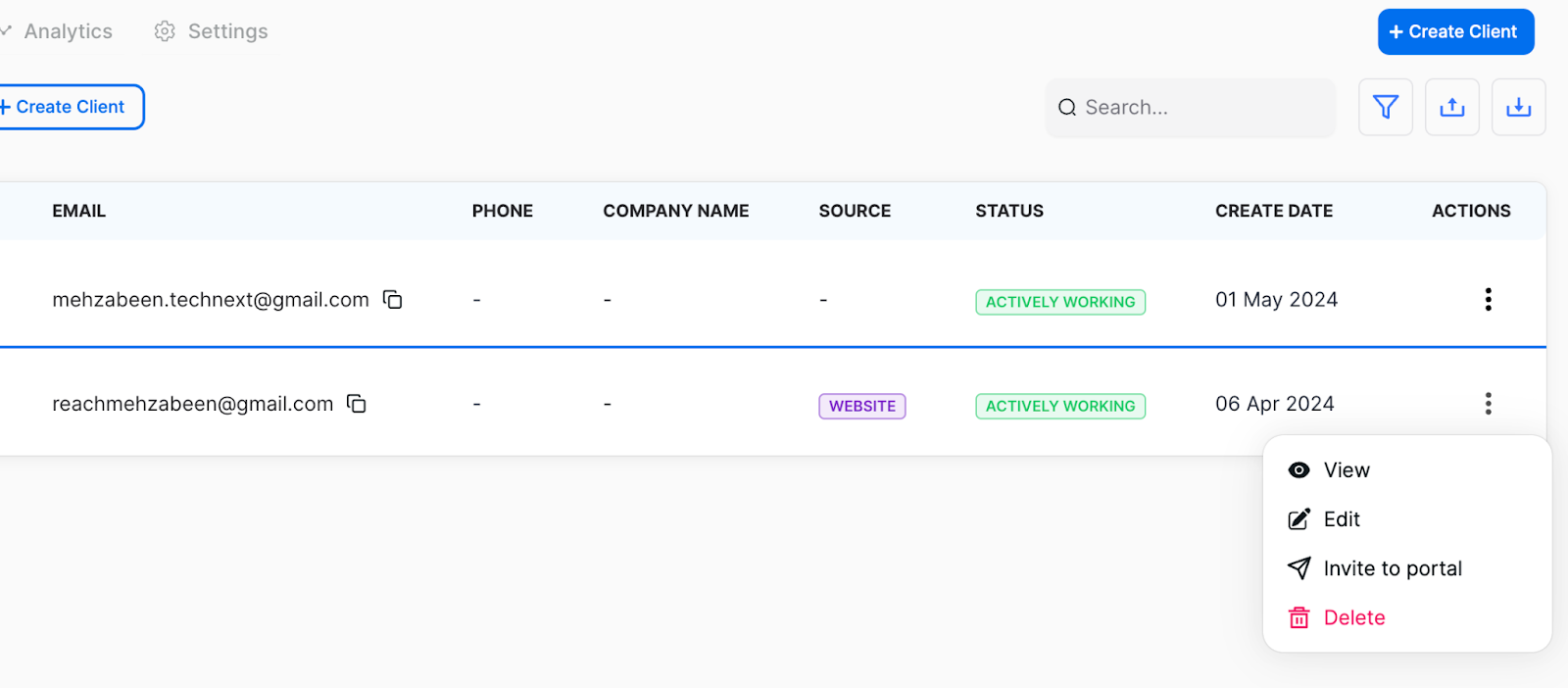
Inviting clients to the portal is a breeze. Simply add them within OneSuite and send an invitation via email. They’ll receive a personalized dashboard within the Client Portal, ready to embark on a collaborative and successful project journey! See how you can do it,

Head over to “Clients” section tab in your OneSuite dashboard, you can create clients from scratch and invite them to the client portal or you if you have already added existing clients in the dashboard, you can invite them too. Please see the following images to guide you through,
invite client

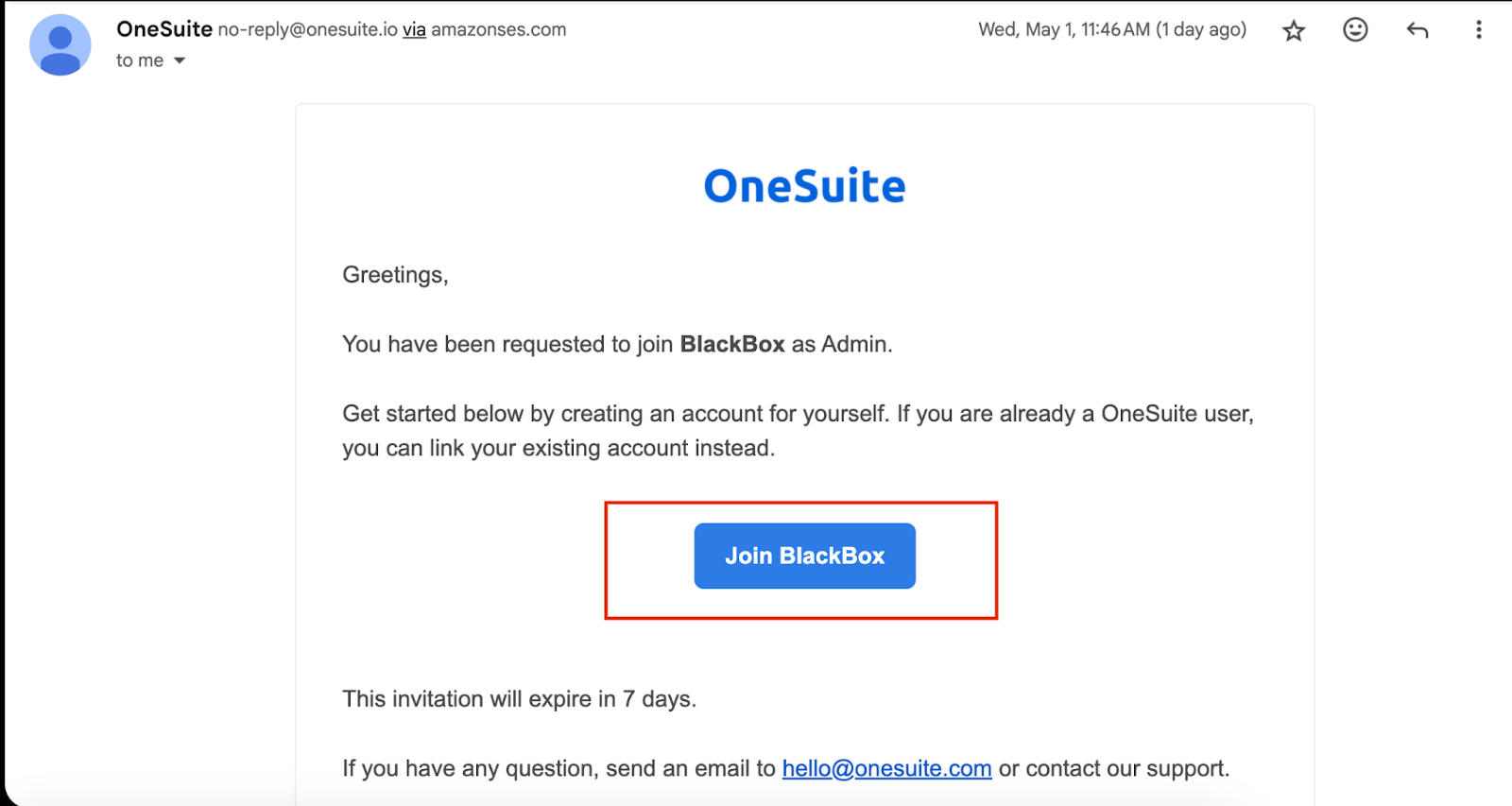
Sending Invitations: Clients will receive invitations via email.

Accepting Invitations: Clients can accept invitations from their email, which will redirect them to their dashboard within the Client Portal.
invite client

Here’s what your clients can expect: #

  • Project Visibility: Gain a clear understanding of ongoing projects, associated documents, and invoices through a user-friendly dashboard.
  • Progress Tracking: Stay informed about project progress with a visual representation of completed tasks. This allows for better planning and informed decision-making.
  • Project Management at their Fingertips: Clients can view assigned projects, add new tasks, track progress, and collaborate seamlessly with your team.
  • Effortless Document Access: Download and review important project documents at their convenience, eliminating the need for lengthy email requests.
  • Clear Invoice Management: View and download invoices directly within the portal, streamlining the payment process.
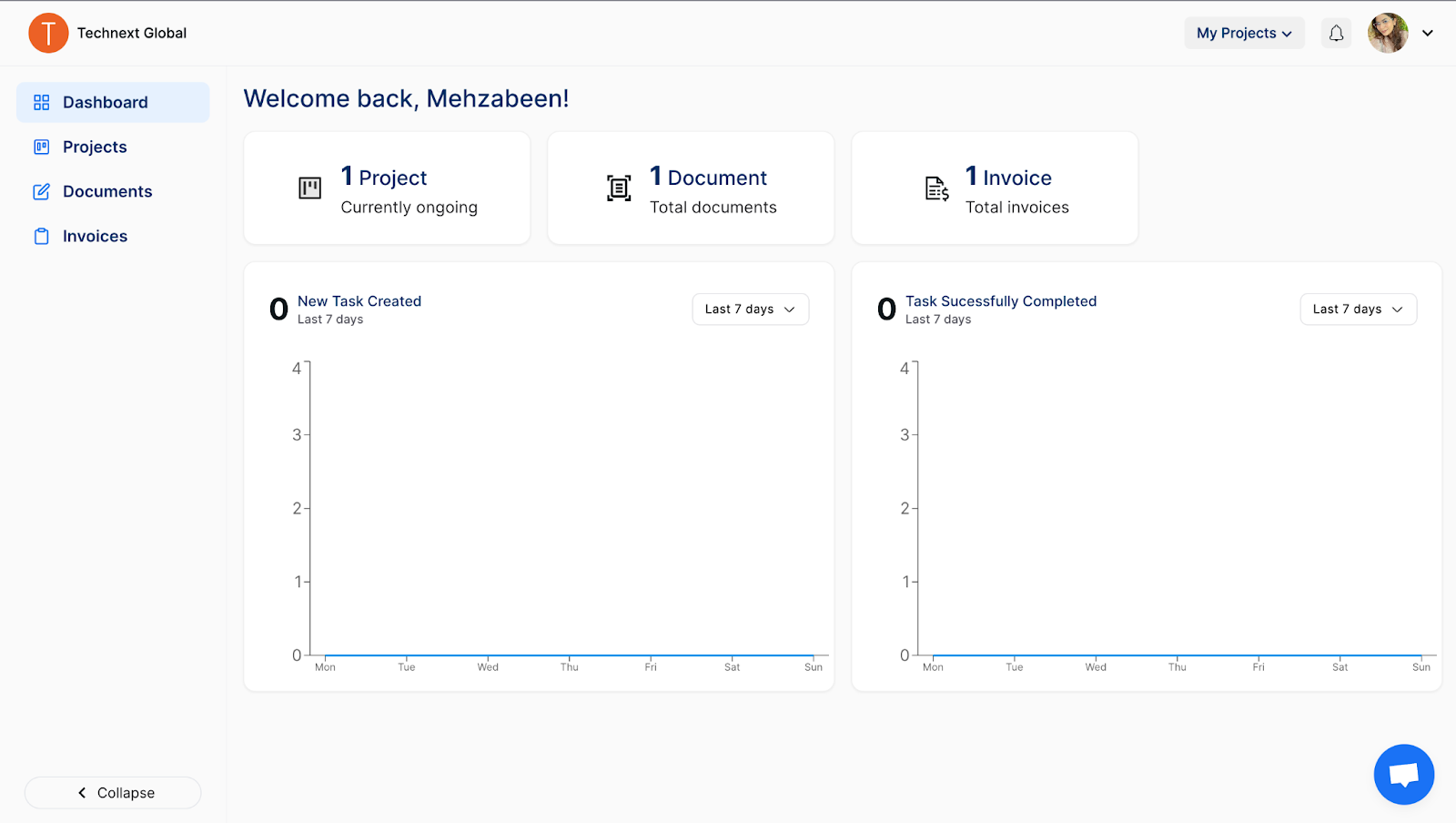
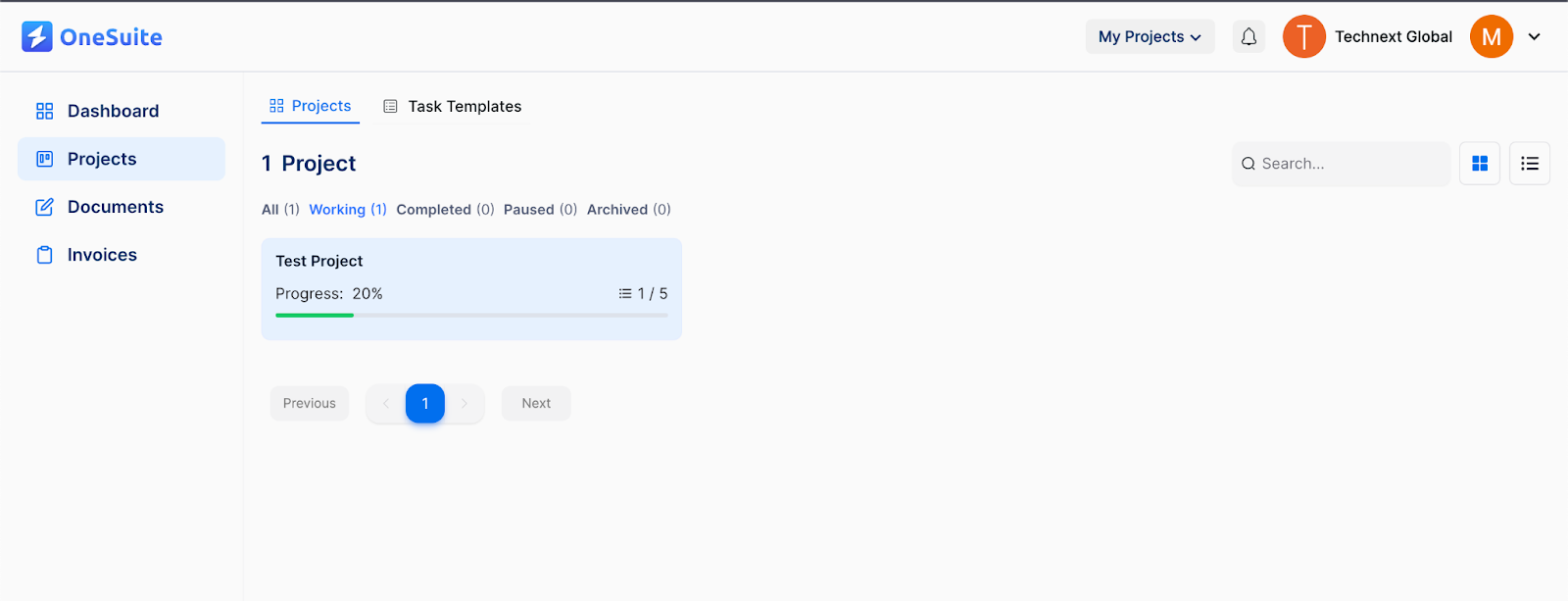
client dashboard

client dashboard

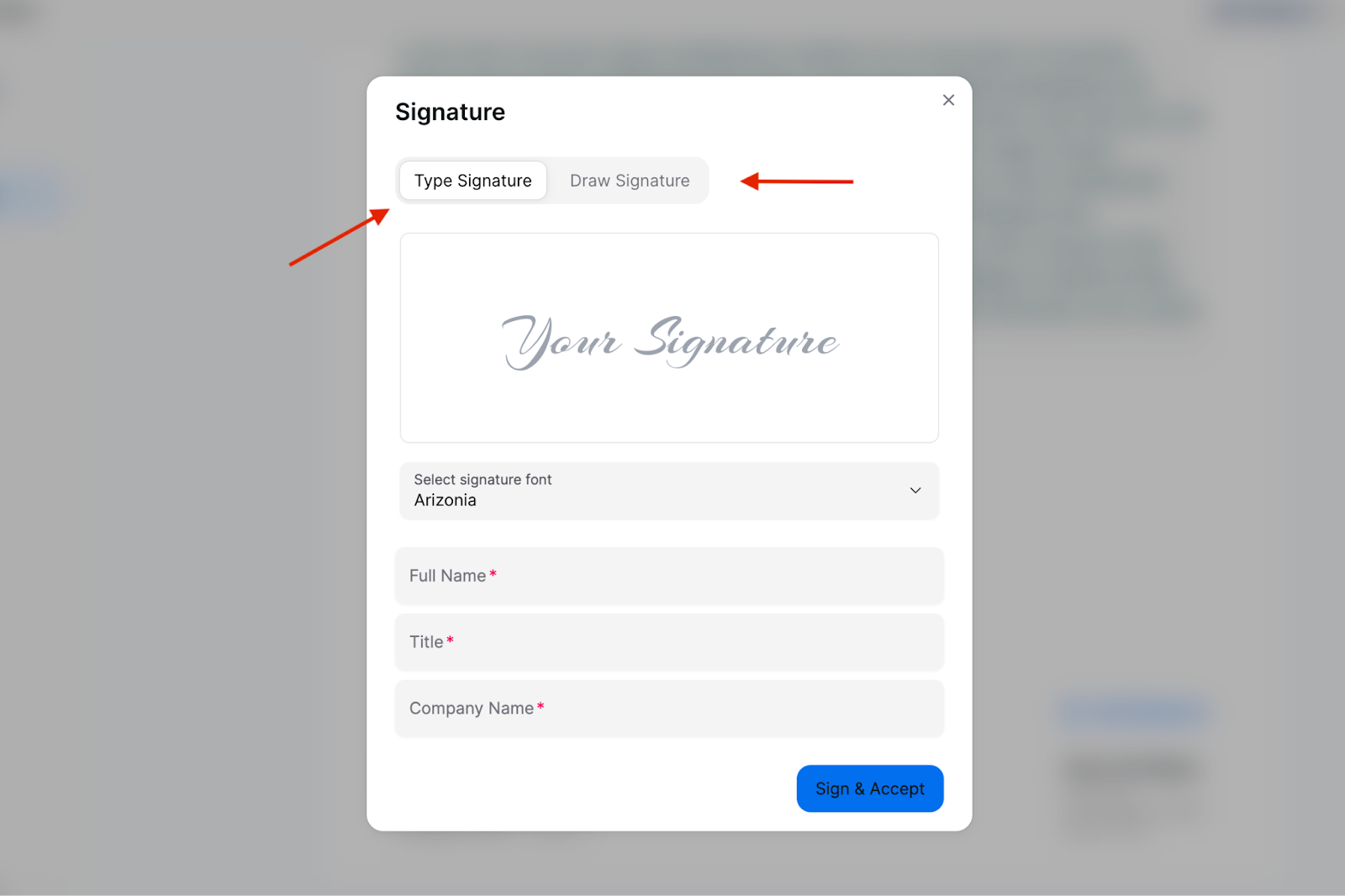
View download and add signatures in the shared documents,
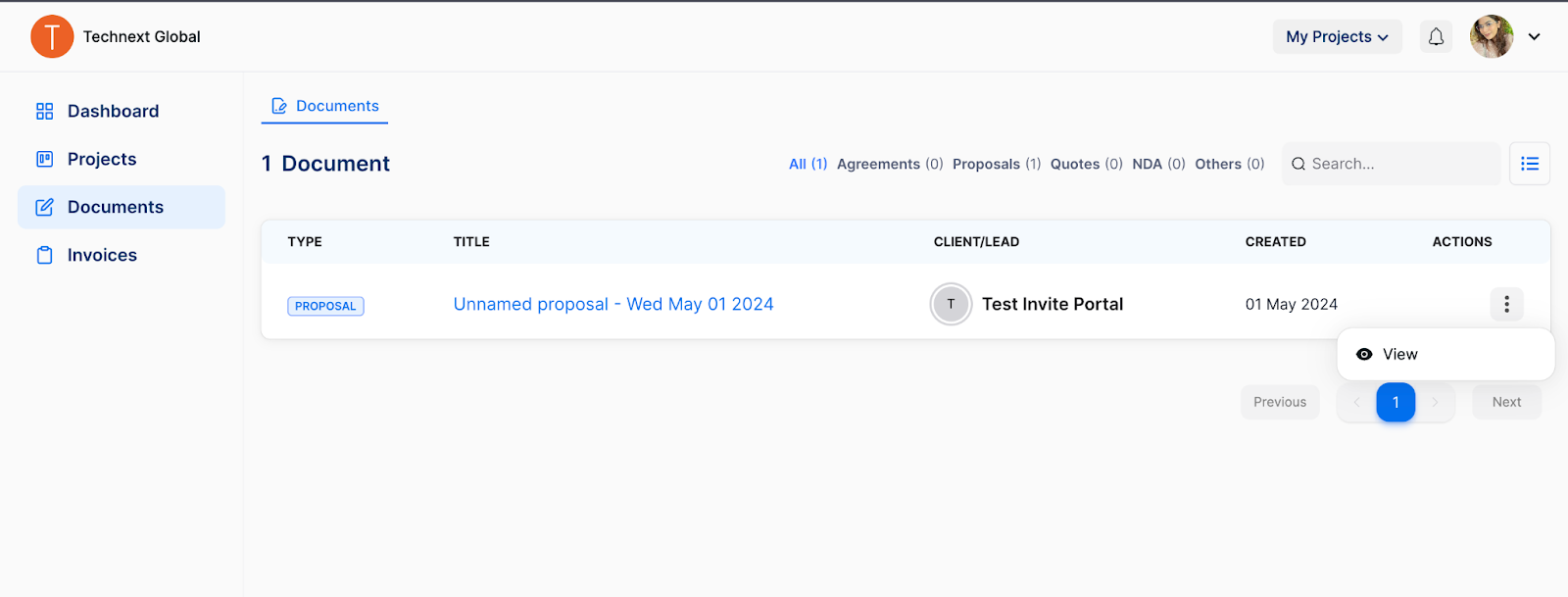
client portal documents

client signature

Client Access to Invoices in OneSuite #

OneSuite empowers you to streamline communication and transparency throughout the billing process. Here’s how your clients benefit:

  • Effortless Invoice Access: Clients can easily access and view all invoices generated for them directly within the OneSuite Client Portal. This eliminates the need for them to search through emails or wait for physical copies.
  • Downloadable Records: OneSuite empowers clients to download invoices in various formats for record-keeping or sharing purposes. This ensures they have a readily accessible copy of the invoice for their accounting needs.

By embracing the Client Portal, you unlock a new level of client engagement and project management efficiency. Let’s build stronger relationships and achieve outstanding results together!

Updated on May 12, 2024

Did this article answer your question?

  • Happy
  • Sad
Imports, Exports, and SearchVideo Documentation : Client Management

Leave a Reply Cancel reply

Your email address will not be published. Required fields are marked *

This site uses Akismet to reduce spam. Learn how your comment data is processed.

Table of Contents
  • Here's how it empowers collaboration:
  • Getting Started is Easy!
  • Here's what your clients can expect:
  • Client Access to Invoices in OneSuite
OneSuite Logo

Streamline your agency's workflow while you focus on growth—manage clients, projects, teams, proposals, contracts, and invoices effortlessly with OneSuite!

product hunt

Follow Us On

  • Facebook
  • X
  • Instagram
  • LinkedIn

Join Our Community

  • Facebook
  • WhatsApp

Features

Projects

Lead Pipeline

Documents

Invoices

Client Portal

Teams

Resources

Contact

Support

Docs

Blog

Branding

Become an affiliate

Agency Partner Program

Public roadmap

Book a demo

Compare

OneSuite vs. Kitchen Co

OneSuite vs. Moxie

OneSuite vs. Flowlu

OneSuite vs. Plutio

OneSuite vs. Bonsai

OneSuite vs. ClientManager

  • Terms of use
  • Privacy policy
  • Cookie policy
  • Refund policy
  • Acceptable use policy
  • Data processing terms
  • Solutions
    • Client Portal

      Ensure transparency & gain trust

      Invoice

      Create invoices in minutes & get paid

      Project Management

      Manage tasks smartly & deliver timely

      CRM

      Nurture leads and win more clients

      Document & E-Signature

      Create & sign documents easily

      Team & Collaborators

      Work together, stay aligned

      Email Inbox

      Manage client emails in one place

      Time Tracking

      Track hours and boost productivity

      Productized Service

      Package and sell services easily

  • Use Cases
    • Marketing Agency

      Manage campaigns, clients, and billing in one place so you can focus on delivering results.

      SEO Agency

      Track projects, share reports, and invoice clients without juggling five different tools.

      Video Editing

      Streamline approvals, revisions, and payments so you spend more time in the timeline.

      Local SEO

      Organize multi-location clients, automate invoicing, and keep every project on track.

      Photography

      From booking to final delivery, manage your entire client workflow in a single dashboard.

      Event Management

      Coordinate timelines, vendors, and client communications without anything slipping through the cracks.

      Creative Agency

      One workspace for briefs, feedback, and billing so your creative energy stays on the work.

      Consulting

      Proposals, project tracking, and invoicing unified so you look as professional as your advice.

      IT Services

      Manage tickets, retainers, and client portals without duct-taping a dozen SaaS tools together.

  • Resources
    • Documentation

      Read guides and help docs

      Affiliate

      Partner and earn together

      Integrations

      Connect tools effortlessly

      Roadmap

      See what’s coming next

      Changelog

      Stay updated with the latest

      Support

      Get help whenever you need it

      Compare

      See how OneSuite stacks up

      Case Study

      Real results, real teams

      FAQ

      Find answers to common questions

  • Pricing
  • For Agency
  • Documentation
  • Public Roadmap
  • Book a demo
  • Get Support