Connect Revolut Business to OneSuite with a key from your Revolut account. Go to Settings > Integrations > Payment and click Connect on the Revolut Business card. Paste the secret key of your Production API key into the Merchant API secret key, choose a Currency, and click Save. You need a Revolut Merchant account.
In this guide you’ll learn how to:
- Find your Revolut Merchant API secret key
- Connect Revolut Business to OneSuite
- Choose the currency Revolut Business uses
- Switch Revolut Business on for an invoice
Before you start
- You need a Revolut Business account with a Merchant account. Revolut’s guide says Production API keys are available once your Merchant account is approved.
- You need access to Settings. If you can’t see Integrations, ask an admin.
- An API key is a code that lets one app work with another. Keep its secret key private.
- Use the secret key of the Production API key to take real payments.
What does OneSuite ask for when you connect Revolut Business?
| Field | Where to find it | Required |
|---|---|---|
| Merchant API secret key | In Revolut Business, open Settings, then APIs, then Merchant API. Use the secret key of the Production API key. The example in the field starts with sk_. | Yes |
| Currency | Starts as British Pound Sterling (GBP). OneSuite uses it when an invoice has no currency of its own. | No |
How do I connect Revolut Business to OneSuite?
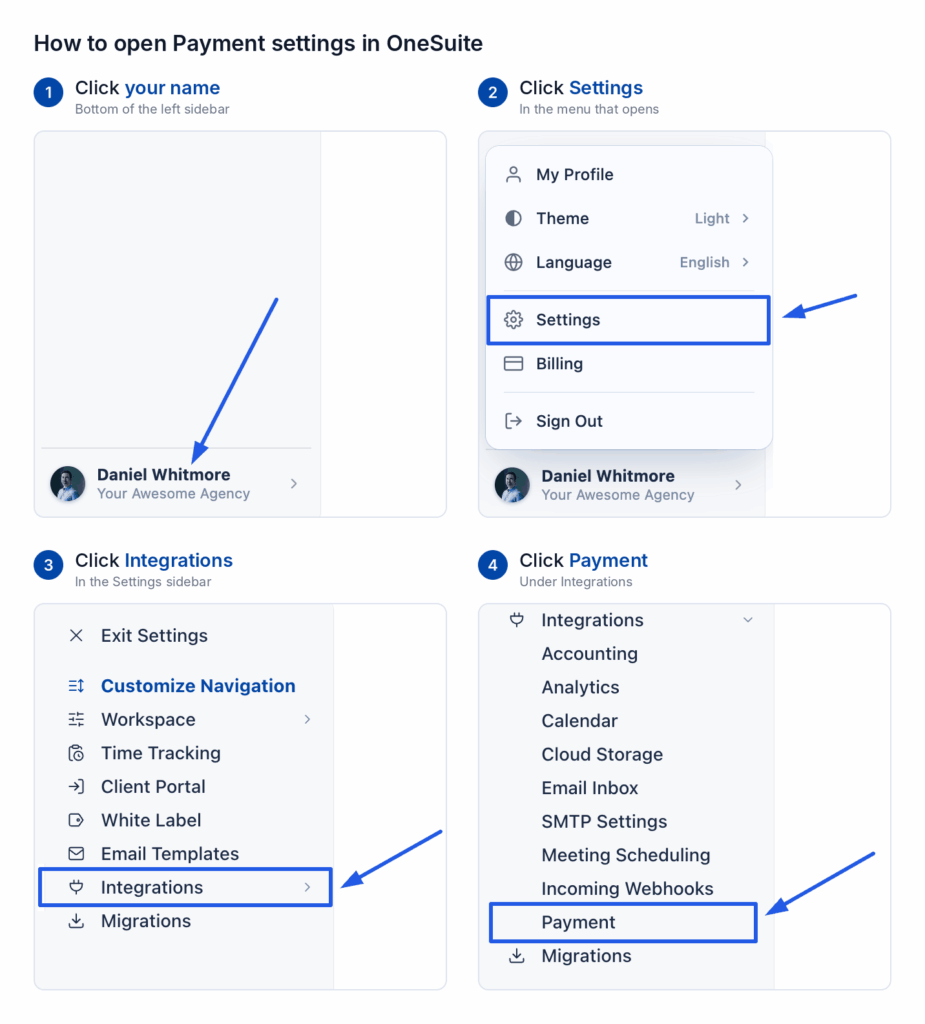
- Click your name at the bottom of the sidebar, then click Settings.
- Under Integrations, click Payment.
- On the Payment Methods page, find Revolut Business and click Connect.
- In Revolut Business, open Settings, then APIs, then Merchant API.
- Copy the secret key of the Production API key.
- Paste it into the Merchant API secret key in OneSuite.
- Check the Currency setting.
- Click Save.
How do I check if it worked?
The Revolut Business card on the Payment Methods page now says Connected instead of Not connected. You also see Revolut Business marked Connected under Invoices > Configure > Getting paid > Online payments.
OneSuite switches a connected gateway on for every new invoice. An invoice you created earlier keeps its own choice. To use Revolut Business on an older invoice:
- Open the invoice.
- Switch Revolut Business on in its Payments panel.
- Save the invoice and send it again.
If something goes wrong
Does your Revolut menu look different from the path above? Follow Revolut’s Merchant API guide.
FAQs
Do I need a Revolut Merchant account?
Yes. The key you paste into OneSuite needs a Revolut Merchant account.
Which Revolut key does OneSuite need?
The secret key of the Production API key. You find it under Merchant API in Revolut Business.
Does Revolut Business need a webhook in OneSuite?
No. A webhook is how a payment service tells OneSuite that a client has paid. The Revolut Business dialog shows no webhook URL, so you have nothing to add in Revolut.
What to do next
See every gateway: Browse all the guides in Payment Integration.
Record the money that arrives: Log payments made outside a gateway with How to Record Invoice Payments.