Connect PayPal so your clients can pay invoices online with PayPal. Go to Settings > Integrations > Payment and click Connect on the PayPal card. Paste the Client ID and Secret from your PayPal REST app, choose a Currency, and click Save.
In this guide you’ll learn how to:
- Find your PayPal Client ID and Secret
- Connect PayPal to OneSuite
- Avoid mixing Live and Sandbox credentials
- Switch PayPal on for an invoice
Before you start
- You need a PayPal account with access to the PayPal Developer Dashboard.
- You need access to Settings. If you can’t see Integrations, ask an admin.
- A REST app is the app in PayPal that holds your credentials. Your credentials are your Client ID and Secret. They are codes that let OneSuite work with your PayPal account.
- Live and Sandbox apps have different credentials. Live takes real payments. Sandbox is a test mode.
- Decide which app OneSuite should use. Then take both values from that one app.
What does OneSuite ask for when you connect PayPal?
| Field | Where to find it | Required |
|---|---|---|
| Client ID | In the PayPal Developer Dashboard, open Apps & Credentials, then choose your REST app. | Yes |
| Secret | In the same REST app. | Yes |
| Currency | Starts as US Dollar (USD). OneSuite uses it when an invoice has no currency of its own. | No |
How do I connect PayPal to OneSuite?
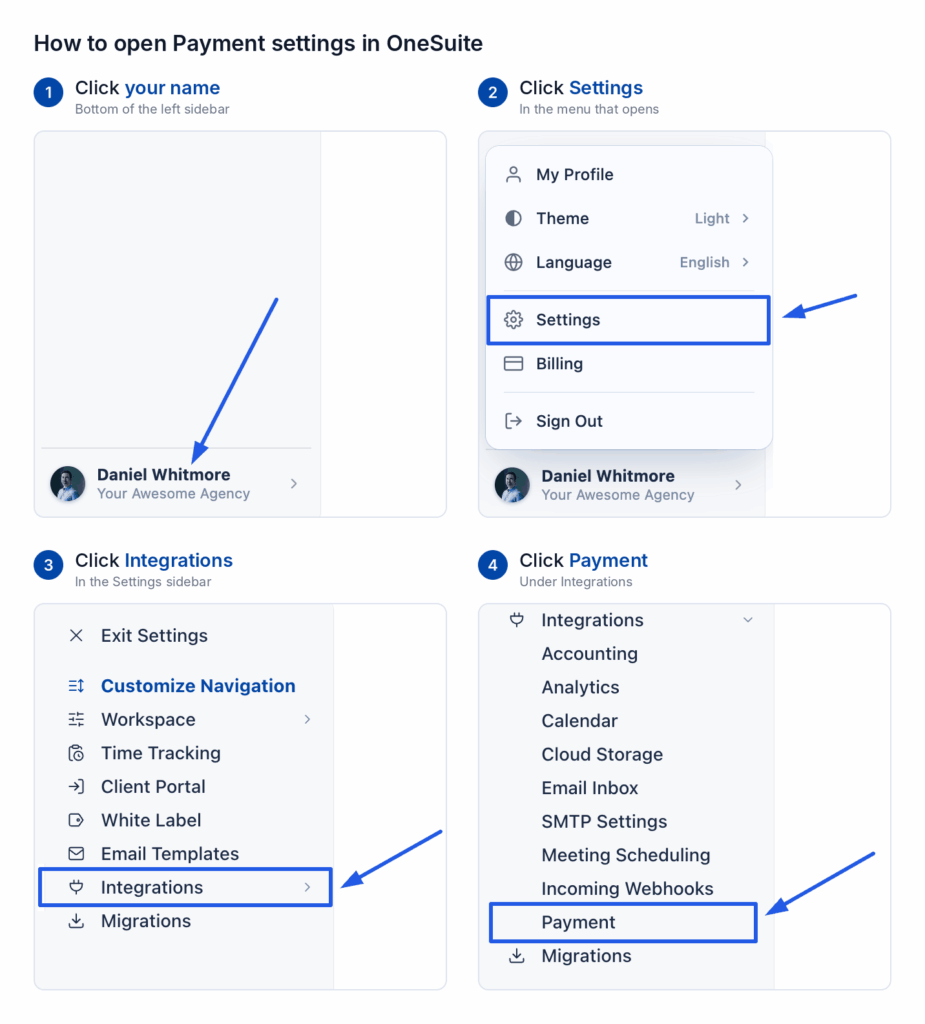
- Click your name at the bottom of the sidebar, then click Settings.
- Under Integrations, click Payment.
- On the Payment Methods page, find PayPal and click Connect.
- In the PayPal Developer Dashboard, open Apps & Credentials.
- Choose your REST app.
- Copy the Client ID.
- Paste it into Client ID in OneSuite.
- Copy the secret.
- Paste it into Secret in OneSuite.
- Check the Currency.
- Click Save.
How do I check if it worked?
The PayPal card on the Payment Methods page now says Connected instead of Not connected. You also see PayPal marked Connected under Invoices > Configure > Getting paid > Online payments.
OneSuite switches a connected gateway on for every new invoice. An invoice you created earlier keeps its own choice. To use PayPal on an older invoice:
- Open the invoice.
- Switch PayPal on in its Payments panel.
- Save the invoice and send it again.
FAQs
Which PayPal credentials does OneSuite need?
A Client ID and a Secret. Both come from the same REST app, under Apps & Credentials in the PayPal Developer Dashboard. PayPal’s guide to REST API credentials shows how to create an app.
Why do my PayPal credentials not work?
Check that your Client ID and Secret come from the same app. If one is from a Live app and the other is from a Sandbox app, they will not match.
Does PayPal need a webhook in OneSuite?
No. A webhook is how a gateway tells OneSuite about a payment. The PayPal dialog shows no webhook URL, so you have nothing to add in PayPal.
What to do next
See every gateway: Browse all the guides in Payment Integration.
Record the money that arrives: Log payments made outside a gateway with How to Record Invoice Payments.