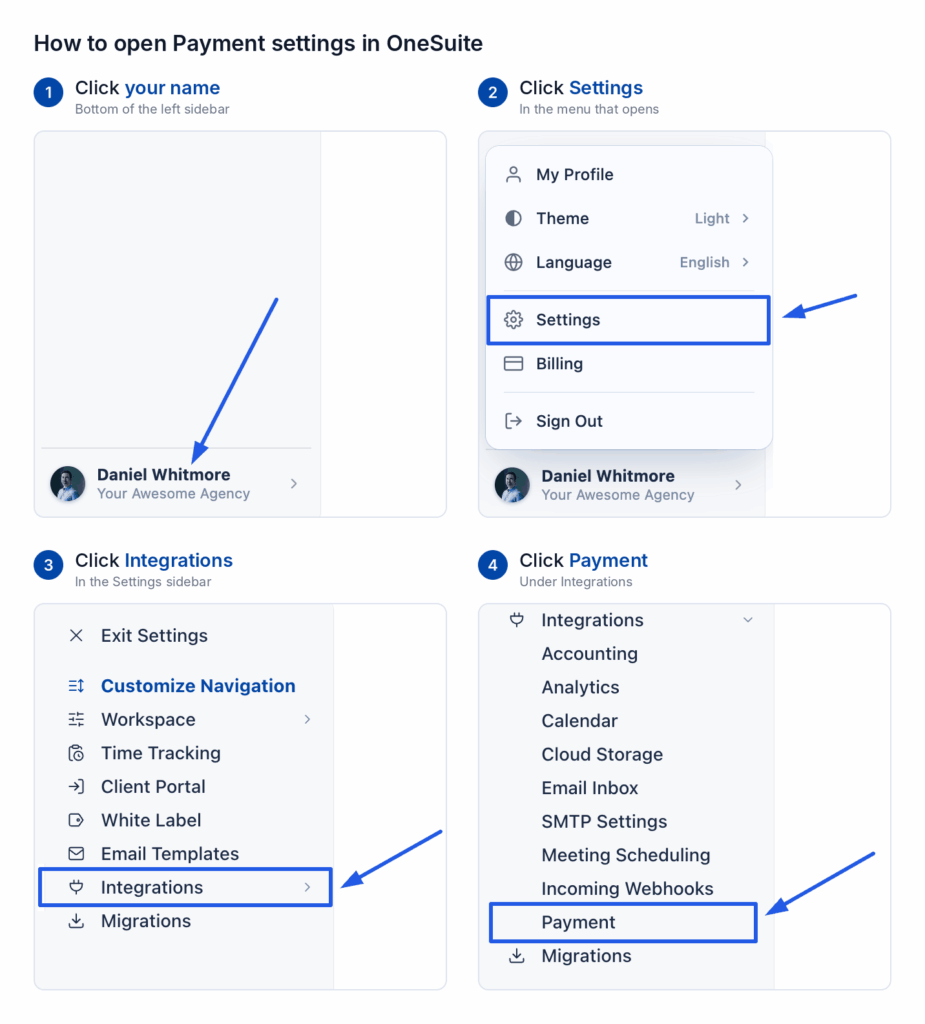
Connect GoCardless so your clients can pay invoices by Pay by Bank. Go to Settings > Integrations > Payment and click Connect on the GoCardless card. Paste a Read-write Access token. Add the OneSuite webhook URL in GoCardless. Then paste the webhook endpoint’s secret into Webhook endpoint secret and click Save.
In this guide you’ll learn how to:
- Create a GoCardless access token
- Add the OneSuite webhook endpoint in GoCardless
- Connect GoCardless to OneSuite
- Understand when an invoice shows as paid
Before you start
- You need access to Settings. If you can’t see Integrations, ask an admin.
- You need a GoCardless account. Only an admin can create an access token in GoCardless.
- An access token is a private code from GoCardless. It lets OneSuite work with your GoCardless account. Keep it private.
- A webhook is a web address that GoCardless calls to tell OneSuite about a payment. The webhook you add in GoCardless is called a webhook endpoint.
- GoCardless takes invoice payments by Pay by Bank. Payers in the UK pay in GBP. Payers in supported Eurozone countries pay in EUR.
- Use the same environment for the access token and the webhook endpoint. The environment is either sandbox or live. Sandbox is for practice and live is for real payments.
What does OneSuite ask for when you connect GoCardless?
| Field | Where to find it | Required |
|---|---|---|
| Access token | In the GoCardless Dashboard, open Developers, then Create, then Access token. Choose Read-write access. A read-only token cannot open a payment. | Yes |
| Webhook endpoint secret | In the GoCardless Dashboard, open Developers, then Webhooks. GoCardless shows the secret when you create the webhook endpoint. | Yes |
| Currency | Starts as British Pound Sterling (GBP). OneSuite uses it when an invoice has no currency of its own. | No |
The dialog also shows a Webhook URL for your GoCardless dashboard box with a copy button.
How do I connect GoCardless to OneSuite?
- Click your name at the bottom of the sidebar, then click Settings.
- Under Integrations, click Payment.
- On the Payment Methods page, find GoCardless and click Connect. Keep the dialog open.
- In GoCardless, create an access token with Read-write access.
- Paste the token into Access token.
- Copy the webhook URL from the dialog.
- Add the URL in GoCardless, as shown in the next section.
- Copy the endpoint’s secret.
- Paste the secret into Webhook endpoint secret.
- Check the Currency.
- Click Save.
How do I add the GoCardless webhook?
OneSuite cannot add the endpoint for you. You add it in GoCardless yourself.
- In the OneSuite dialog, click the copy button beside Webhook URL for your GoCardless dashboard.
- In GoCardless, open Developers, then Webhooks.
- Start a new webhook endpoint.
- Paste the OneSuite URL.
- Give the endpoint a name.
- Create the endpoint.
- Click the new endpoint in the list.
- Copy its secret.
- Paste the secret into Webhook endpoint secret in OneSuite.
How do I check it worked?
The GoCardless card on the Payment Methods page now says Connected instead of Not connected. You also see GoCardless marked Connected under Invoices > Configure > Getting paid > Online payments.
OneSuite switches a connected gateway on for every new invoice. An invoice you created earlier keeps its own choice. To use GoCardless on an older invoice:
- Open the invoice.
- Switch GoCardless on in its Payments panel.
- Save the invoice and send it again.
If something goes wrong
- Payments are not recorded. If you change the endpoint’s secret or create a new endpoint in GoCardless, paste the new secret into Webhook endpoint secret in OneSuite. If you don’t, OneSuite cannot verify GoCardless’s updates. Some payments may then not be recorded. In GoCardless, open Developers, then Webhooks. It shows the past 3 months of deliveries, which are the updates GoCardless sent. You can retry failed ones there.
- The invoice shows a payment in progress. Until GoCardless confirms a payment, the invoice may show it as in progress. OneSuite marks the invoice paid when GoCardless confirms it.
FAQs
Why isn’t my GoCardless invoice marked paid straight away?
OneSuite records a bank payment on the invoice once GoCardless confirms it has collected the money. That can take a few days.
Which access does the GoCardless token need?
It needs Read-write access. A read-only token cannot open a payment.
Do I need a webhook for GoCardless?
Yes. OneSuite needs the webhook to learn when GoCardless confirms a payment. The steps are in the webhook section above.
What to do next
See every gateway: Browse all the guides in Payment Integration.
Record the money that arrives: Log payments made outside a gateway with How to Record Invoice Payments.