Skip to content
OneSuite Logo
  • ProductExpand
    • Project Management

      Time Tracking

      Track hours and boost productivity

      Projects & Tasks

      Manage tasks smartly and deliver on time

      Team & Collaborators

      Work together and stay aligned

      Reporting

      See where your agency stands

      Finance Management

      Invoicing

      Create invoices in minutes and get paid

      Subscriptions

      Bill clients on repeat automatically

      Expense Tracking

      Track costs and bill them back

      Budgeting

      Plan budgets and protect margins

      Client Management

      Client Portal

      Ensure transparency and gain trust

      Documents & E-Signature

      Create and sign documents easily

      CRM

      Nurture leads and win more clients

      Email Inbox

      Manage client emails in one place

  • Use CasesExpand
    • Marketing Agency

      Campaigns, clients, and billing together

      Local SEO

      Multi-location clients, billing on track

      Creative Agency

      Briefs, feedback, and billing unified

      SEO Agency

      Projects, reports, and invoices in one

      Photography

      Booking to delivery in one place

      Consulting

      Proposals, tracking, and invoicing together

      Video Editing

      Approvals, revisions, and payments simplified

      Event Management

      Timelines, vendors, and clients covered

      IT Services

      Tickets, retainers, and portals managed

  • ResourcesExpand
    • Documentation

      Read guides and help docs

      Roadmap

      See what’s coming next

      Compare

      See how OneSuite stacks up

      Affiliate

      Partner and earn together

      Changelog

      Stay updated with the latest

      Case Study

      Real results, real teams

      Integrations

      Connect tools effortlessly

      Support

      Get help whenever you need it

      FAQ

      Find answers to common questions

  • Pricing
  • For Agency

Start free trial

Help Center

  • Documentation
  • Public Roadmap
  • Book a demo
  • Get Support
OneSuite Logo
intro to onesuite

OneSuite 101

6
  • Introduction to OneSuite
  • Understanding OneSuite’s Structure
  • How Solutions Work Together
  • Navigating OneSuite
  • All OneSuite Capabilities
  • OneSuite Glossary
quick start guide

Quick Start Guide

9
  • Sending Your First Invoice
  • Tracking Your First Hours
  • Setting Up Your Business
  • Adding Your Payment Methods
  • Inviting Team Members
  • Adding Your First Leads
  • Adding Your First Client
  • Giving Your Client Portal Access
  • Sending Your First Proposal

CRM

9
  • Opportunity Automation
  • Customizing Your CRM
  • Customizing Your Opportunities View
  • CRM Overview
  • Adding People
  • Adding Companies
  • Creating Opportunity
  • How Opportunities, Companies, and People Work Together
  • Understanding Pipeline Stages
client

Client Management

6
  • Adding Clients
  • Client Profiles
  • Client Portal Customization 
  • Understanding the Clients Solution
  • The OneSuite Client Portal
  • Video Documentation : Client Management
pm

OneSuite Project Management

12
  • How to Track Project Hours and Costs
  • How to Set Up Project Billing and Budgets
  • Laying the Groundwork: Project Creation in OneSuite
  • Customize the Project Management Module
  • Managing Project Boards in OneSuite
  • Subtask Behavior & Movement Management
  • Custom Categories, Tags, and Labels in Projects
  • Adding Tasks to Boards in OneSuite
  • Custom Fields
  • Task Templates
  • Project Templates
  • Video Documentation : Project Management

Documents

5
  • Overview
  • Creating a Document from Scratch
  • Uploading a PDF Document
  • Sending Documents to Parties to Sign
  • Signing a Document
team

OneSuite's Team Management

4
  • Inviting Collaborators in OneSuite
  • Creating Personalized Departments in OneSuite
  • Managing Team Members in OneSuite
  • Video Documentation : Team Collaboration
Invoices & Payments

Invoices & Payments

9
  • How to Use Retainers
  • How to Record Invoice Payments
  • Access & Navigation
  • Invoice Settings & Customization
  • Create One-time Invoices
  • Creating Recurring Invoices
  • How to set taxes on your invoices
  • How to Add Direct Bank Transfer Instructions to Your Invoices
  • How to Customize Invoice Email Messages

Time Tracking & Timesheets

6
  • Timesheet Preferences
  • Work Types
  • Time Tracking in OneSuite
  • Invoice Generation from Billable Hours
  • Timesheet Management & Approval
  • Time Tracking & Timesheets 

Email Inbox

5
  • Email Inbox Overview
  • Connect Microsoft Outlook
  • Integrate Gmail in OneSuite 
  • Send and Receive Email in OneSuite 
  • Create and Use Email Templates in OneSuite

Calendar View

1
  • Calendar View

Dashboard

7
  • Overview 
  • How to Customize Your Dashboard
  • Client Portal Dashboard 
  • Monitor Documents, Contracts & Marketing Lead Sources
  • CRM, Client & Pipeline Widgets — OneSuite Dashboard Guide
  • Track Tasks, Deadlines & Project Activity in OneSuite
  • Track Revenue Trends, Forecasts & Top Projects in OneSuite

Expenses

2
  • Expense Categories
  • Tracking Expenses

Approvals

2
  • Approval Policy
  • Approving Timesheets and Expenses

Estimates

1
  • Estimates

Reports

2
  • Saving and Scheduling Reports
  • Reports Overview

Integrations

5
  • How to Use Webhooks and API Keys
  • How to Connect Analytics Tools
  • How to Connect Calendar, Files and Meeting Tools
  • How to Connect Accounting and Payment Tools
  • Integrations Overview

Settings & Billing

4
  • Imports, Exports, and Search
  • Managing Your OneSuite Subscription
  • Setting Up Profiles and Permissions
  • Setting Up Your Workspace
View Categories
  • Home
  • Docs
  • OneSuite's Team Management
  • Creating Personalized Departments in OneSuite

Creating Personalized Departments in OneSuite

0:00 / 2:19
  • View as Markdown Open this page as plain Markdown (opens in a new tab)
  • Open in ChatGPT Ask questions about this page (opens in a new tab)
  • Open in Claude Ask questions about this page (opens in a new tab)
  • Open in Google AI Studio Ask questions about this page (Google account required) (opens in a new tab)

Departments let you group your team into broad categories, such as Marketing, Development or Sales, each with its own label colour. Assigning people to departments gives you a clear overview of your team’s make-up and expertise, which helps teams with diverse roles stay organized and work together.

In this guide you’ll learn how to:

  • Open the Departments section
  • Create a department with a name that fits your team structure
  • Choose a colour for each department’s label

How to create a department

You create a department from the Departments section with the Create Department button.

  1. Go to the Departments section in OneSuite. This is where you define your team structure.
  2. Click Create Department.
  3. Enter a department name that reflects your team structure. Think of departments as broad categories, for example “Marketing”, “Development” or “Sales”.
  4. Assign team members to the relevant departments, so you get a clear overview of your team’s make-up and expertise.
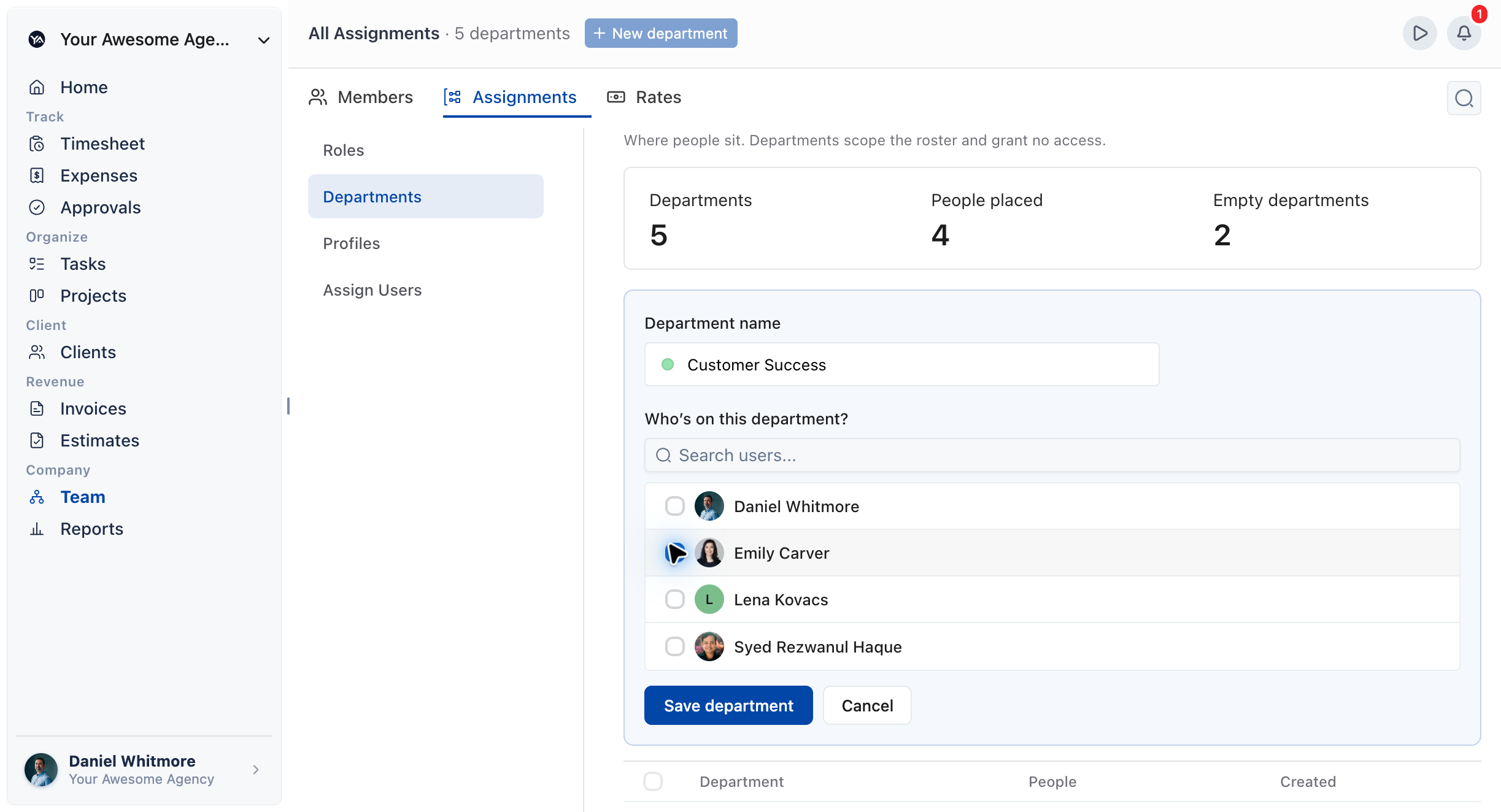
Departments section with the Create Department form open

How to choose a department colour

You choose a colour for each department’s label while you create the department.

  1. While creating the department, pick a colour for its label.
  2. Use a different colour for each department, so you can tell them apart at a glance.
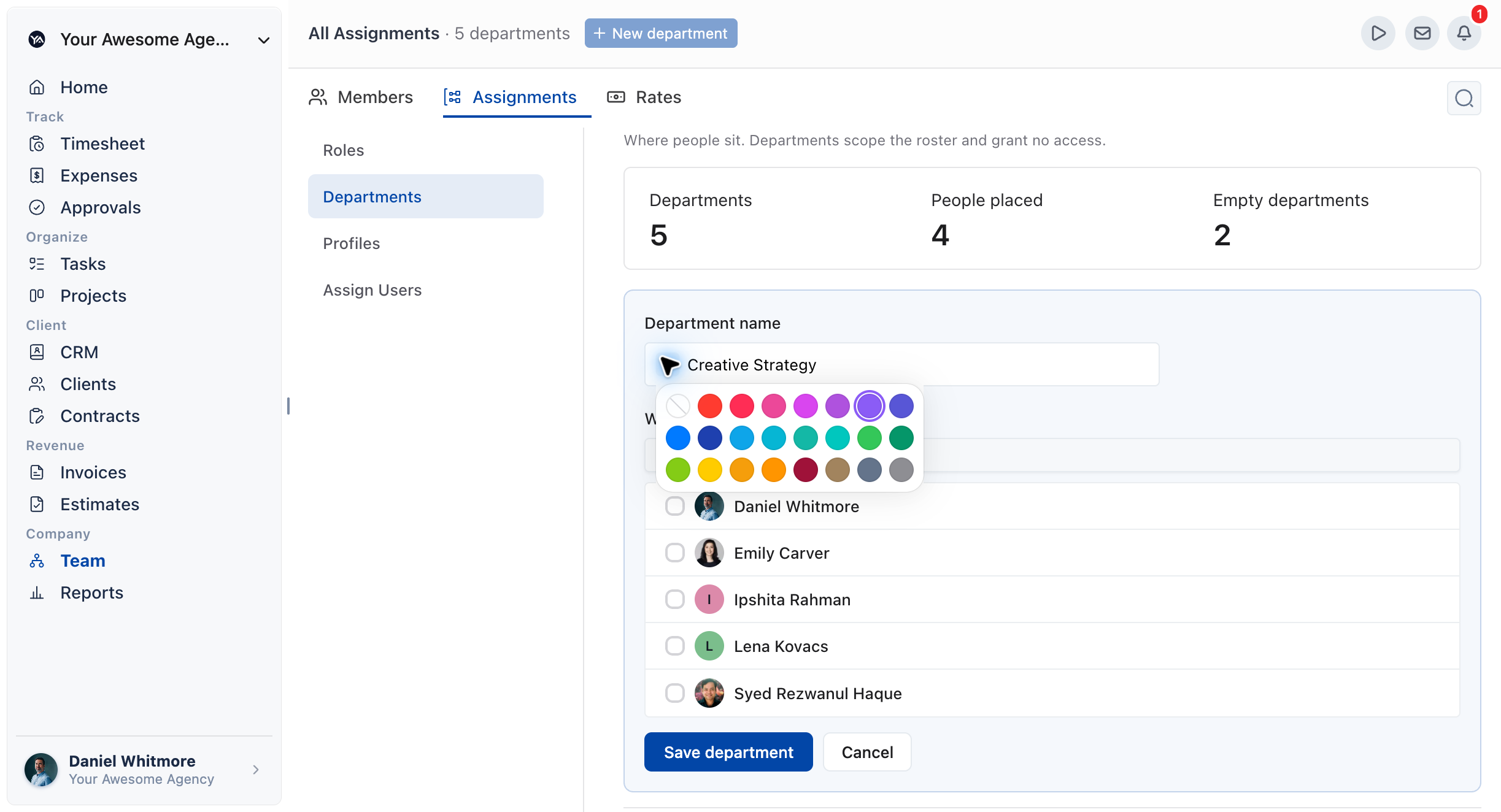
Department colour picker with a label colour selected

Not using OneSuite yet? Start your free trial →

FAQs

What is a department in OneSuite?

A department is a broad category for your team, such as “Marketing”, “Development” or “Sales”. Assigning people to departments shows your team’s make-up and expertise at a glance.

Can I give each department its own colour?

Yes. While you create a department, you can choose a colour for its label, so departments are easy to tell apart.

Where do I create departments?

In the Departments section. Click Create Department to start a new one.

How should I name my departments?

Use names that reflect your own team structure. Keep them broad, such as “Marketing”, “Development” or “Sales”, rather than one per person.

Can I just use roles instead of departments?

You can describe people in other ways, but departments give you broad team categories with coloured labels. They show at a glance how your team is made up and where its expertise sits.

What to do next

Bring people in: Add teammates you can place in departments with Inviting Collaborators in OneSuite.

Organize your team: Edit people’s details and access with Managing Team Members in OneSuite.

Control access: Decide what each person can see and do with How to Set Up Profiles and Permissions.

Updated on October 1, 2026

The complete client journey platform for agencies that scale.

2810 N Church St,
Delaware, USA, 19802

call +1 (302) 433-6002+1 (302) 433-6002
product hunt

Follow Us On

  • Facebook
  • X
  • Instagram
  • LinkedIn

Join Our Community

  • Facebook

Ask AI for a summary
of Onesuite

Features

Client portal

CRM & Lead pipeline

Project management

Documents & e-signature

Billing & invoice

Time tracking

Expense tracking

Budgeting

Reporting

API documentation

Resources

Documentation

Public roadmap

Become an affiliate

Agency partner program

About

Contact

Support

Blog

Branding

Book a demo

Compare

vs. Bonsai

vs. Assembly

vs. Dubsado

vs. Plutio

vs. Harvest

vs. HoneyBook

vs. Wayfront

Product demo

  • Terms of use
  • Privacy policy
  • Cookie policy
  • Refund policy
  • Acceptable use policy
  • Data processing terms
  • Product
    • Project Management

      Time Tracking

      Track hours and boost productivity

      Projects & Tasks

      Manage tasks smartly and deliver on time

      Team & Collaborators

      Work together and stay aligned

      Reporting

      See where your agency stands

      Finance Management

      Invoicing

      Create invoices in minutes and get paid

      Subscriptions

      Bill clients on repeat automatically

      Expense Tracking

      Track costs and bill them back

      Budgeting

      Plan budgets and protect margins

      Client Management

      Client Portal

      Ensure transparency and gain trust

      Documents & E-Signature

      Create and sign documents easily

      CRM

      Nurture leads and win more clients

      Email Inbox

      Manage client emails in one place

  • Use Cases
    • Marketing Agency

      Campaigns, clients, and billing together

      Local SEO

      Multi-location clients, billing on track

      Creative Agency

      Briefs, feedback, and billing unified

      SEO Agency

      Projects, reports, and invoices in one

      Photography

      Booking to delivery in one place

      Consulting

      Proposals, tracking, and invoicing together

      Video Editing

      Approvals, revisions, and payments simplified

      Event Management

      Timelines, vendors, and clients covered

      IT Services

      Tickets, retainers, and portals managed

  • Resources
    • Documentation

      Read guides and help docs

      Roadmap

      See what’s coming next

      Compare

      See how OneSuite stacks up

      Affiliate

      Partner and earn together

      Changelog

      Stay updated with the latest

      Case Study

      Real results, real teams

      Integrations

      Connect tools effortlessly

      Support

      Get help whenever you need it

      FAQ

      Find answers to common questions

  • Pricing
  • For Agency
  • Documentation
  • Public Roadmap
  • Book a demo
  • Get Support