
Skip to content

OneSuite Logo

  • SolutionsExpand
    • Projects icon

      Projects

      Manage tasks smartly & deliver timely

      Lead Pipeline icon

      CRM

      Nurture leads and win more clients

      Invoice icon

      Invoice

      Create invoices in minutes & get paid

      Client Portal icon

      Client Portal

      Ensure transparency & gain trust

      Document Hub icon

      Document Hub

      Create & sign documents easily

      Team

      Manage tasks smartly & deliver timely

  • Use Cases
  • Pricing
  • ResourcesExpand
    • Documentation

      Support

      Roadmap

      Changelog

      FAQ

      Blog

      API Doc

  • CompanyExpand
    • About
Try for free

Help Center

  • Documentation
  • Public Roadmap
  • Book a demo
  • Get Support
OneSuite Logo
intro to onesuite

OneSuite 101

6
  • Introduction
  • Understanding OneSuite’s Structure
  • How Solutions Work Together
  • Navigating OneSuite
  • All OneSuite Capabilities
  • OneSuite Glossary
quick start guide

Quick Start Guide

7
  • Setting Up Your Business
  • Adding Your Payment Methods
  • Inviting Team Members
  • Adding Your First Leads
  • Adding Your First Client
  • Giving Your Client Portal Access
  • Sending Your First Proposal
lg

Lead Pipeline Management

9
  • Installing and Using OneSuite Lead Grabber Chrome Extension
  • Add your Leads in OneSuite
  • Creating Company Information
  • Creating Industry, Sources, and Tags in OneSuite:
  • Never Miss an Update: Setting Tasks
  • Add your Leads in Bulk
  • Lead Grabber to the Rescue!
  • From Lead to Client
  • Video Documentation: Lead Pipeline
client

Client Management in OneSuite

6
  • Understanding the Clients Solution
  • Adding Clients
  • Client Profiles
  • Imports, Exports, and Search
  • The OneSuite Client Portal
  • Video Documentation : Client Management
pm

Manage your Projects Effortlessly

7
  • Subtask Behavior & Movement Management
  • Laying the Groundwork: Project Creation in OneSuite
  • Managing Project Boards in OneSuite
  • Adding Tasks to Boards in OneSuite
  • Lifesaver:Templates in OneSuite
  • Custom Categories, Tags, and Labels in Projects
  • Video Documentation : Project Management

Documents

5
  • Overview
  • Creating a Document from Scratch
  • Uploading a PDF Document
  • Sending Documents to Parties to Sign
  • Signing a Document
team

OneSuite's Team Management

4
  • Inviting Collaborators in OneSuite
  • Creating Personalized Departments in OneSuite
  • Managing Team Members in OneSuite
  • Video Documentation : Team Collaboration
Invoices & Payments

Invoices & Payments

7
  • Access & Navigation
  • Invoice Settings & Customization
  • Create One-time Invoices
  • Creating Recurring Invoices
  • How to set taxes on your invoices
  • How to Add Direct Bank Transfer Instructions to Your Invoices
  • How to Customize Invoice Email Messages
View Categories
  • Home
  • Docs
  • Client Management in OneSuite
  • Adding Clients

Adding Clients

There are three ways to add clients to OneSuite: create them manually, convert them from CRM opportunities, or import multiple clients at once. This guide covers manual creation for both Individual and Company client types.

Adding an Individual Client #

To create an Individual client:
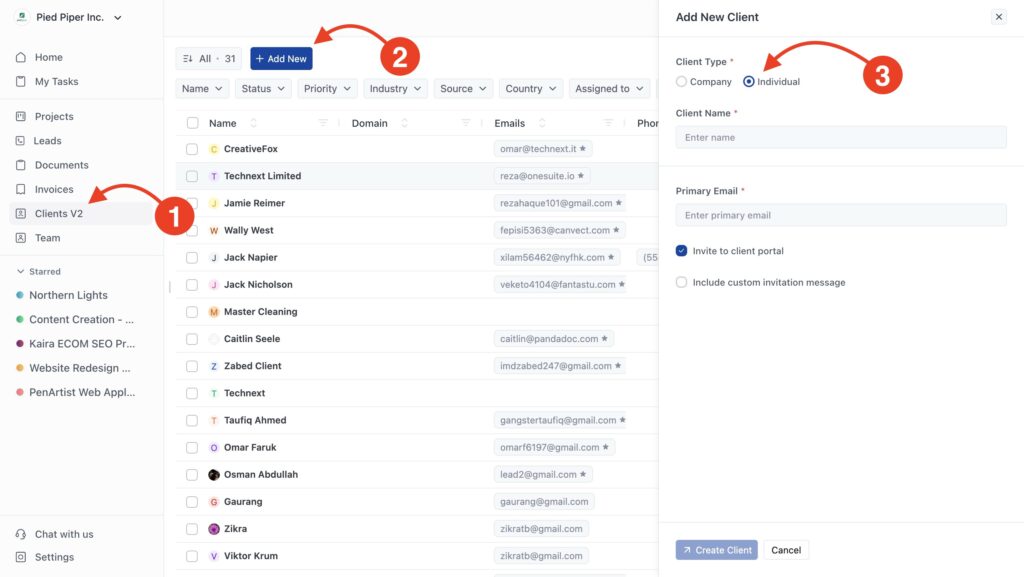
Create individual clients in onesuite
  1. Click Clients in the sidebar
  2. Click Add New in the top right
  3. Select Individual as the client type
  4. Fill in the client information:
    • Client Name (required)
    • Primary Email – Add one primary email of that client.
  5. Optional: Check Invite to client portal to send portal access immediately
  6. Optional: Check Include custom invitation message to personalize the invitation
  7. Click Create Client

The client appears in your client list immediately.

Adding a Company Client #

To create a Company client:
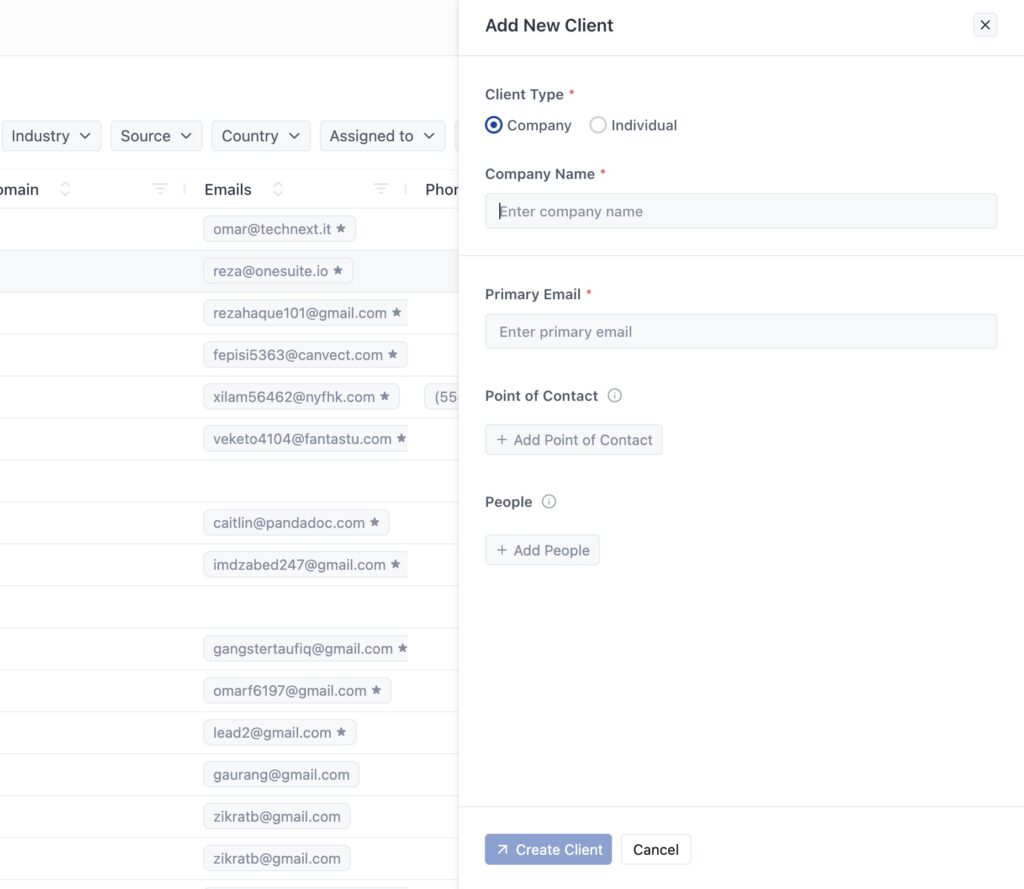
adding company type clients in onesuite

The first two steps are the same as creating Individual clients.

  1. Select Company as the Client Type
  2. Fill in the required fields:
    • Company Name – Organization name
    • Primary Email – Main company contact email
  3. Optional: Click Add Point of Contact to designate your primary contact person
  4. Optional: Click Add People to add additional contacts who work at the company
  5. Click Create Client

Adding People during setup: You can add multiple people who work at the company right away. Click Add People and enter their name, email, phone, and job title. Add as many people as you need before creating the client.

Setting Point of Contact during setup: Point of Contact is your primary communication person. Click Add Point of Contact to designate who you’ll talk to most often. You can only set this after adding at least one person to the People list.

Client Portal Invitation #

When creating any client, you can invite them to the client portal right away. The portal gives clients access to view their projects, invoices, and documents.

Invite to client portal – Check this to send an automatic invitation email to the primary email address. The client receives login credentials and can access their portal immediately.

Include custom invitation message – Check this to add a personalized message to the invitation email. Use this to welcome the client or provide context about the portal.
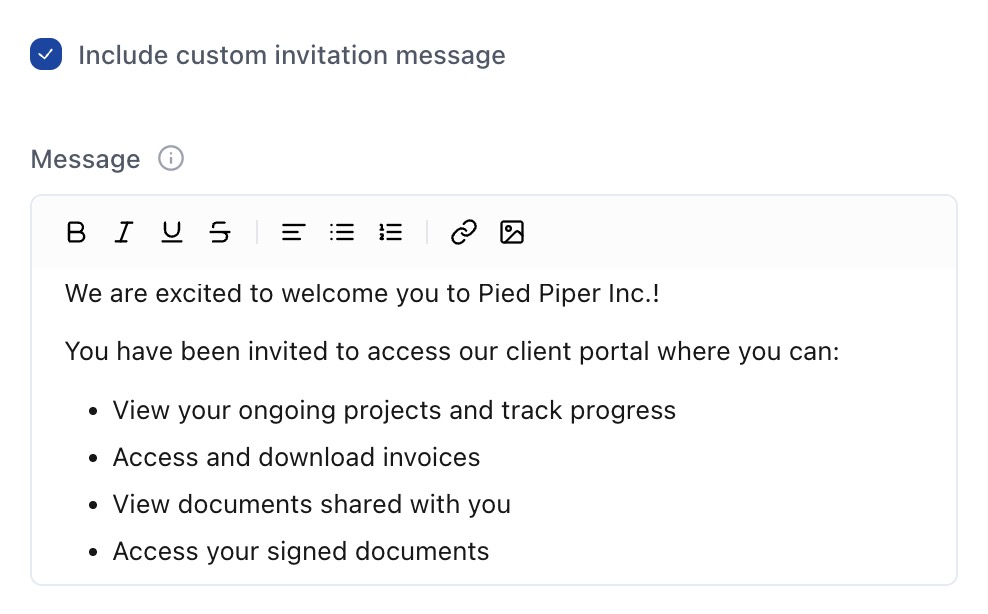
Custom invitation email for clients

If you skip the invitation during creation, you can send it later from the client profile.

Other Ways to Add Clients #

Converting from CRM When you close an opportunity in your CRM, OneSuite can automatically create a client record. All contact information and history transfers over. See Converting Leads to Clients for details.

Adding More Information After Creation #

The quick creation form only asks for essentials. After creating a client, open their profile to add:
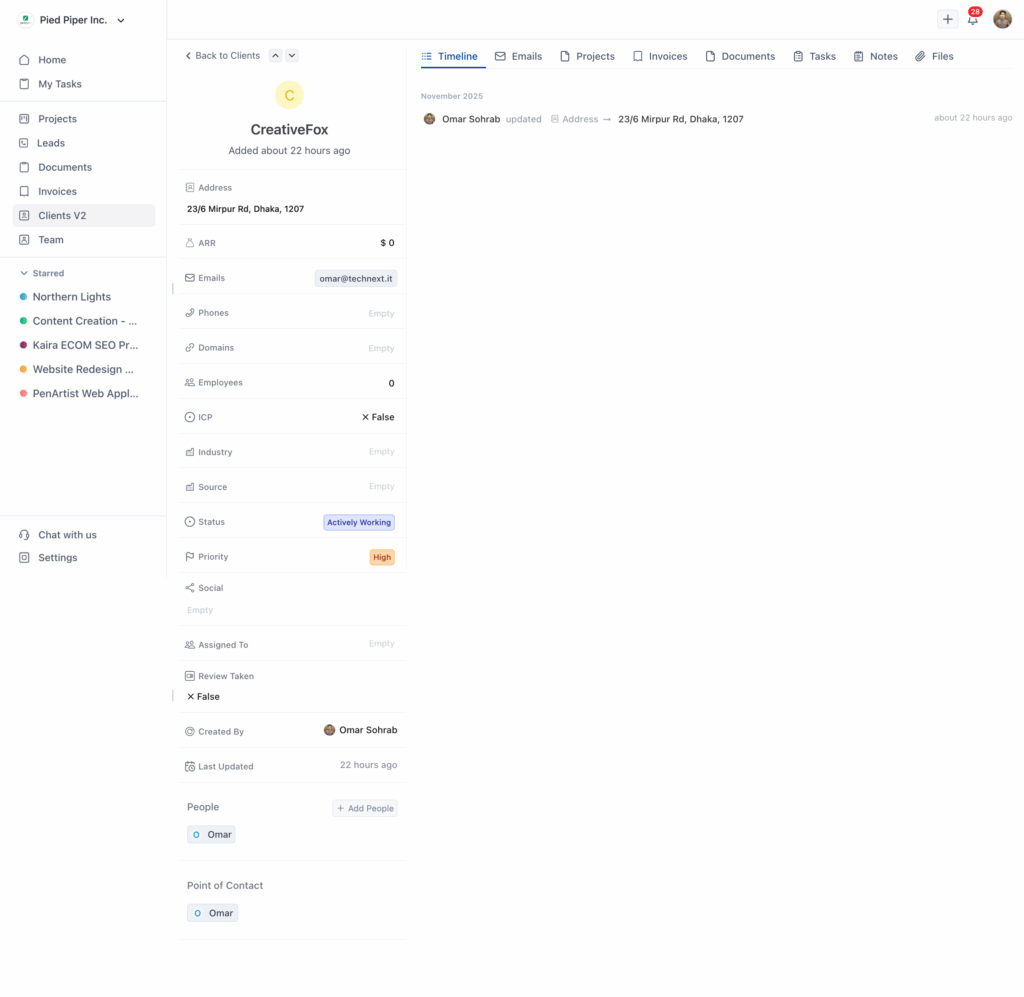
Contact Details:

  • Additional email addresses
  • Phone numbers
  • Physical address
  • Website/domain

Classification:

  • Status (Actively Working, Completed, Abandoned)
  • Priority (High, Very High, Medium)
  • Industry
  • Source (how they found you)
  • Assigned To (team member managing this client)

Company-Specific Fields:

  • Annual Recurring Revenue (ARR)
  • Number of employees
  • Ideal Customer Profile indicator
  • Multiple domains

For Company Clients: If you didn’t add People or Point of Contact during creation, you can add them anytime from the client profile.

Updated on November 26, 2025

Did this article answer your question?

  • Happy
  • Sad
Understanding the Clients SolutionClient Profiles

Leave a Reply Cancel reply

Your email address will not be published. Required fields are marked *

This site uses Akismet to reduce spam. Learn how your comment data is processed.

Table of Contents
  • Adding an Individual Client
  • Adding a Company Client
  • Client Portal Invitation
  • Other Ways to Add Clients
  • Adding More Information After Creation
OneSuite Logo

Streamline your agency's workflow while you focus on growth—manage clients, projects, teams, proposals, contracts, and invoices effortlessly with OneSuite!

product hunt

Follow Us On

  • Facebook
  • X
  • Instagram
  • LinkedIn

Join Our Community

  • Facebook
  • WhatsApp

Features

Projects

Lead Pipeline

Documents

Invoices

Client Portal

Teams

Resources

Contact

Support

Docs

Blog

Branding

Become an affiliate

Public roadmap

Book a demo

Compare

OneSuite vs. Kitchen Co

OneSuite vs. Moxie

OneSuite vs. Flowlu

OneSuite vs. Plutio

OneSuite vs. Bonsai

OneSuite vs. ClientManager

  • Terms of use
  • Privacy policy
  • Cookie policy
  • Refund policy
  • Acceptable use policy
  • Data processing terms
  • Solutions
    • Projects icon

      Projects

      Manage tasks smartly & deliver timely

      Lead Pipeline icon

      CRM

      Nurture leads and win more clients

      Invoice icon

      Invoice

      Create invoices in minutes & get paid

      Client Portal icon

      Client Portal

      Ensure transparency & gain trust

      Document Hub icon

      Document Hub

      Create & sign documents easily

      Team

      Manage tasks smartly & deliver timely

  • Use Cases
  • Pricing
  • Resources
    • Documentation

      Support

      Roadmap

      Changelog

      FAQ

      Blog

      API Doc

  • Company
    • About
  • Documentation
  • Public Roadmap
  • Book a demo
  • Get Support
Try OneSuite   →